
Daily context
Start with a brief built from your phone.
FoneClaw can summarize recent SMS, notifications, and device information into one working view.
Give me today's brief.
- 1Read the requested sources
- 2Group important items
- 3Return a concise brief
FONECLAW FOR ANDROID
Configure the model, permissions, and tool approvals behind every Android action.
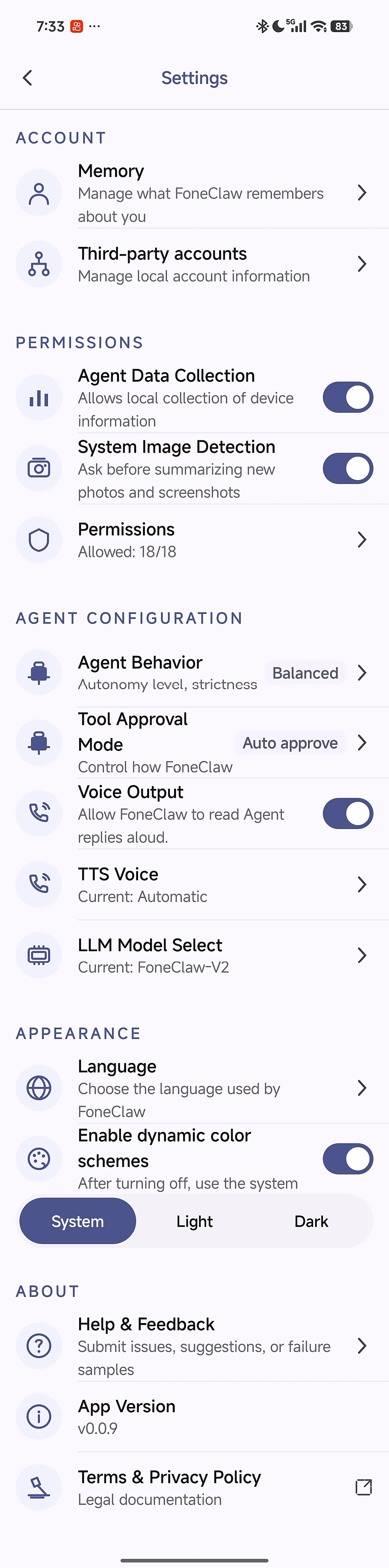
FoneClaw is the phone agent. The selected LLM drives understanding and planning; built-in tools perform supported actions on the phone.
Every visual below comes from a localized FoneClaw product recording.
Daily context
FoneClaw can summarize recent SMS, notifications, and device information into one working view.
Give me today's brief.
Messages
Ask for a time range or contact and get the relevant messages grouped and summarized.
Summarize this week's SMS by contact.
Device audit
Check memory, storage, battery, network, app permissions, and sensitive app signals from one request.
Check my phone health.
Phone control
Adjust supported system controls or work with nearby Wi-Fi and Bluetooth devices.
Set brightness to 60%, then find my speaker.
Cross-app work
Summarize configured email, find a destination, and open a supported navigation route.
Summarize recent email, then navigate to the hotel.
Visible context
When enabled, a new screenshot or photo can trigger a prompt to summarize the visible content.
Summarize this screenshot.
Search the public catalog used by Skills and Workflows. Risk and approval labels come from the GitHub project.
127 public built-in tools
| Tool | Risk | Approval | What it does |
|---|---|---|---|
camera_open_photoScreen and App | SENSITIVE_READ | Require approval | Open a specific visible photo from the system gallery. Use this only when the user explicitly asks to view or open a specific photo. Do not use this as a follow-up after camera_take_photo unless the user explicitly asks to view or open the captured photo. indexFromLatest is 1-based in newest-first order: 1 opens the latest photo, 2 opens the second latest photo, 3 opens the third latest photo. |
camera_take_photoScreen and App | SENSITIVE_READ | Require approval | Capture a new photo and return it as an image attachment when model vision is available. Use this when the user's intent is to capture a new photo. Leave lensFacing unset or auto for normal photo capture. Choose lensFacing=front only for front-facing or selfie intent; choose back only when the user explicitly asks for the back camera. Keep explicitLensSelection false for plain/default photo capture, even if the default physical lens is back. Set explicitLensSelection true only when the user explicitly asks for front, back, rear, or selfie capture. Do not call camera_open_photo after this tool unless the user explicitly asks to view or open the photo. Call this tool directly. Capture uses the native system camera first. Explicit front/back capture may use the direct backend only if the native camera cannot honor the requested lens. Do not ask the user to grant permission before calling this tool. |
cross_app_read_screenScreen and App | LOW | Auto | Open or switch to a target Android app, wait until that app is stably in the foreground, and return the visible accessibility screen tree. Use this when one request asks to both open/switch to an app and read, inspect, describe, summarize, or tap an existing visible control, and no dedicated domain tool can complete the request. Do not split that task into launch_app and get_screen_info. This tool does not capture a screenshot or tap nodes itself; use fresh returned node IDs with tap_node only when the user requested a tap. |
get_installed_map_appsScreen and App | LOW | Auto | Query installed map apps supported by map tools. Returns each app's display name and package name. |
get_screen_infoScreen and App | LOW | Auto | Get UI elements from the currently visible app screen. Each element has a node ID (for example [n3]) that can be used with tap_node, scroll, or input_text. Do not use this to read, list, search, or summarize Android notifications; use sysinfo tools instead. Do not cache this result because node IDs change on each call. |
input_textScreen and App | DEVICE_CONTROL | Require approval | Replace the text in one visible editable field in the current Android app. Call get_screen_info first and pass a current node marked edit. This action only enters text; it does not submit the form, tap Send, or press Enter. Do not reuse node IDs. |
launch_appScreen and App | DEVICE_CONTROL | Require approval | Open a launchable Android app by package name or installed app display name. This changes the foreground app and may expose that app's screen. Use an exact package name when possible. If the result is ambiguous, ask the user to choose one returned package. |
play_store_check_appScreen and App | LOW | Auto | Check whether an exact Android package name is listed on Google Play by requesting https://play.google.com/store/apps/details?id=<packageName>. This is a read-only network check. Use it before play_store_install. |
play_store_installScreen and App | EXTERNAL_EFFECT | Require approval | Open a specific Google Play app details page by exact package name, tap Install, and wait for installation to complete. This tool does not open the installed app. Use only when an exact Android packageName is known. Never use this for fuzzy search results or to guess the first app. If packageName is unknown, ask the user for the exact app package first. Stops if Google Play shows paid, purchase, subscription, update, ambiguous UI, or if installation does not complete before timeout. |
screenshot_openScreen and App | SENSITIVE_READ | Require approval | Open a specific visible screenshot from the system gallery. index is 1-based in the selected order. sortOrder can be newest or oldest. |
screenshot_takeScreen and App | SENSITIVE_READ | Require approval | Capture an Android screen with the FoneClaw accessibility service. The captured image is kept in app-private cache for Agent use and is not added to the system Gallery. Use targetType=current for the current screen, targetType=app with targetApp for opening an app and capturing it, or targetType=notification_shade only for an explicit screenshot or image-capture request involving the visible notification shade. Never use targetType=notification_shade to read, list, query, or summarize notification data; use a SysInfo notification tool instead. Never use this tool merely to locate or verify a control, recover a stale GUI node, or compensate for missing accessibility labels during cross-app GUI automation. Do not call launch_app or system_panel_open before this tool for app or notification-shade capture. Do not use this when the user wants to view an already saved screenshot; use screenshot_open for viewing saved screenshots. |
scrollScreen and App | LOW | Auto | Scroll the current app by using a compatible accessibility scroll action when supported, otherwise perform a bounded swipe gesture. Prefer a fresh node ID marked scroll by get_screen_info. Use viewport only when the screen exposes no usable scroll container. Direction is the viewport destination: down reveals content below, up reveals content above, right reveals content to the right, and left reveals content to the left. This does not confirm that content changed, so call get_screen_info after every successful call before another action. |
tap_nodeScreen and App | LOW | Auto | Tap a UI element on the screen. The element is identified by its node ID, which can be obtained from get_screen_info. |
alarm_modify_alarmDevice Status and System Control | DEVICE_CONTROL | Require approval | Immediately open the Android Clock alarms page when the user wants to modify, edit, adjust, or change an existing alarm. Call this tool for every separate modification request, even if it was already called earlier in the conversation. Do not ask for confirmation. Android does not provide a reliable public API for editing existing alarms, so this tool only navigates to the Clock app for manual editing. |
alarm_set_alarmDevice Status and System Control | DEVICE_CONTROL | Require approval | Set an Android Clock alarm. Collect missing time/repeat/label details before calling. |
bluetooth_connected_devicesDevice Status and System Control | SENSITIVE_READ | Require approval | Return Bluetooth devices currently connected through public Android Bluetooth profiles visible to normal apps. |
bluetooth_nearby_devicesDevice Status and System Control | SENSITIVE_READ | Require approval | Scan and return nearby Bluetooth devices. Includes BLE scan results and classic Bluetooth discovery results when permissions and Bluetooth state allow it. Devices without a readable name are hidden by default. |
bluetooth_pair_deviceDevice Status and System Control | DEVICE_CONTROL | Require approval | Start pairing with a Bluetooth device by MAC address. This launches Android's normal bonding flow and may require user confirmation or PIN entry. |
bluetooth_paired_devicesDevice Status and System Control | SENSITIVE_READ | Require approval | Return Bluetooth devices already paired with this Android device. |
bluetooth_stateDevice Status and System Control | LOW | Auto | Return the current Bluetooth adapter state: on, off, turning_on, turning_off, or unknown. |
close_bluetoothDevice Status and System Control | DEVICE_CONTROL | Require approval | Turn Bluetooth off using the public legacy disable API. If Android refuses, report that normal Android apps cannot turn Bluetooth off on this device. |
device_app_activity_snapshotDevice Status and System Control | SENSITIVE_READ | Require approval | Return a compact recent app activity snapshot from Android UsageStats. Requires usage access; it is not a live background-process monitor. |
device_app_permission_auditDevice Status and System Control | SENSITIVE_READ | Require approval | Return a compact permission-risk audit for installed apps visible to this app. Risk is heuristic and based on declared/granted sensitive permission groups. |
device_app_sensitive_auditDevice Status and System Control | SENSITIVE_READ | Require approval | Return compact sensitive app states: accessibility, notification listener, device admin, overlay, battery optimization exemption, and granted sensitive permission groups. |
device_battery_statusDevice Status and System Control | LOW | Auto | Return compact Android battery and power-save status. No settings are changed. |
device_health_checkDevice Status and System Control | LOW | Auto | Return a compact read-only health snapshot: memory, storage, battery, and network. No settings are changed. |
device_hidden_app_checkDevice Status and System Control | SENSITIVE_READ | Require approval | Return a compact heuristic check for user apps without launcher entries or disabled components. This can flag suspicious apps, but legitimate service-only apps may appear too. |
device_memory_statusDevice Status and System Control | LOW | Auto | Return compact Android memory status. No settings are changed. |
device_network_statusDevice Status and System Control | LOW | Auto | Return compact Android active network status and capabilities. No network settings are changed. |
device_storage_statusDevice Status and System Control | LOW | Auto | Return compact Android internal/shared storage status. No files are scanned or deleted. |
device_time_statusDevice Status and System Control | LOW | Auto | Return the current Android system time zone and Unix timestamp for time-dependent tool calls. Set verifyWithNtp=true only when the system time is disputed or an online reference is required. NTP verification uses ntp1.aliyun.com and never changes the system clock. |
dnd_open_policy_access_settingsDevice Status and System Control | DEVICE_CONTROL | Require approval | Open Android settings where the user can grant FoneClaw Do Not Disturb / Notification Policy access. Do not call this immediately after dnd_set_mode reports that it already opened the settings page. |
dnd_set_modeDevice Status and System Control | DEVICE_CONTROL | Require approval | Set Android Do Not Disturb mode. If policy access is missing or Android rejects the write, this opens the system DND policy access/settings page. |
dnd_statusDevice Status and System Control | LOW | Auto | Read Android Do Not Disturb policy access state and current interruption filter. |
flashlight_set_enabledDevice Status and System Control | DEVICE_CONTROL | Require approval | Turn the Android flashlight on or off using the system camera torch API. |
flashlight_statusDevice Status and System Control | LOW | Auto | Return whether the flashlight is available and the last known torch state. |
flashlight_toggleDevice Status and System Control | DEVICE_CONTROL | Require approval | Toggle the Android flashlight. If the current state is unknown, this turns it on. |
foneclaw_permission_statusDevice Status and System Control | LOW | Auto | Check all current permissions and special-access capabilities of FoneClaw itself. Use this when the user asks which FoneClaw permissions are enabled, missing, limited, or available. This is a fresh read-only check; do not use app audit, notification-panel, or screen-reading tools as a substitute. |
open_bluetoothDevice Status and System Control | DEVICE_CONTROL | Require approval | Request Bluetooth to turn on. For legacy target SDKs this first tries the public enable API, then falls back to Android's system confirmation UI when needed. |
system_panel_openDevice Status and System Control | DEVICE_CONTROL | Require approval | Open one visible Android system panel. Use panel=notifications to open the notification shade, or panel=quick_settings to open quick settings / control center. This tool only opens the selected panel. It does not read, capture, search, list, or summarize panel content. Do not call it when any part of the request asks to read, capture, inspect, describe, or summarize notifications. Call it once only for an explicit panel-open-only request. Requires FoneClaw accessibility service. |
system_settings_open_battery_optimization_entryDevice Status and System Control | DEVICE_CONTROL | Require approval | Open Android battery optimization settings. If appNameOrPackage is provided, open that app's detail page by package name or installed app label. If it cannot be resolved or opened, return failure and do not open another settings page. If empty, open the system battery optimization list/settings page. |
system_settings_open_battery_saver_settingsDevice Status and System Control | DEVICE_CONTROL | Require approval | Open Android Battery Saver / power saving / low power mode settings. Normal apps cannot directly toggle Battery Saver through public APIs, so after settings opens the user must enable or disable it manually. Vendor ROMs may fall back to generic battery settings. |
system_settings_open_date_time_settingsDevice Status and System Control | DEVICE_CONTROL | Require approval | Open the Android Date & time settings page directly. Use this for date, time, automatic time, time zone, or automatic time-zone settings. This launches a system settings Intent and does not require accessibility, screen reading, or tapping. After it succeeds, do not call launch_app, get_screen_info, or tap_node. |
system_settings_open_hotspot_entryDevice Status and System Control | DEVICE_CONTROL | Require approval | Open Android hotspot settings. Normal apps cannot reliably toggle hotspot silently through public Android APIs. If the exact hotspot settings page cannot be opened, this returns failure and does not open another settings page. |
system_settings_open_location_entryDevice Status and System Control | DEVICE_CONTROL | Require approval | Open Android location settings. If appNameOrPackage is provided, open that app's detail page by package name or installed app label. If it cannot be resolved or opened, return failure and do not open another settings page. If empty, open the system Location settings page. |
system_settings_set_auto_rotateDevice Status and System Control | DEVICE_CONTROL | Require approval | Enable or disable Android auto rotation. Requires the special modify-system-settings permission. |
system_settings_set_brightnessDevice Status and System Control | DEVICE_CONTROL | Require approval | Set Android screen brightness. Manual mode writes percent from 1 to 100; auto mode only enables automatic brightness and ignores percent. Requires the special modify-system-settings permission. |
system_settings_set_eye_comfortDevice Status and System Control | DEVICE_CONTROL | Require approval | Open Android Display settings for Eye comfort/Night Light/blue light filter/reading mode. Use this tool instead of only giving manual instructions for multilingual eye-comfort intents. Android vendors expose the exact switch differently, so this tool opens Display settings and lets the user finish the switch on that page. |
system_settings_set_font_scaleDevice Status and System Control | DEVICE_CONTROL | Require approval | Set Android system font scale. Requires the special modify-system-settings permission. Typical values are 0.85 small, 1.0 default, 1.15 large, 1.3 larger, and up to 1.6 extra large. |
system_settings_set_haptic_feedbackDevice Status and System Control | DEVICE_CONTROL | Require approval | Enable or disable Android haptic feedback. Requires the special modify-system-settings permission. |
system_settings_set_screen_timeoutDevice Status and System Control | DEVICE_CONTROL | Require approval | Set Android screen-off timeout in seconds. Requires the special modify-system-settings permission. Values are clamped to 15..1800 seconds. |
system_settings_set_touch_soundsDevice Status and System Control | DEVICE_CONTROL | Require approval | Enable or disable Android touch sounds. Requires the special modify-system-settings permission. |
system_settings_set_user_rotationDevice Status and System Control | DEVICE_CONTROL | Require approval | Lock Android screen rotation. Requires the special modify-system-settings permission and disables auto rotation. Use portrait, landscape, reverse_portrait, or reverse_landscape. |
system_settings_statusDevice Status and System Control | LOW | Auto | Return writable system settings permission state plus current screen brightness, font scale, screen timeout, rotation, touch sounds, and haptic feedback. This reads Android system settings only. |
volume_adjust_streamDevice Status and System Control | DEVICE_CONTROL | Require approval | Raise or lower one Android audio stream by one system step. Choose this for relative volume changes. |
volume_set_all_streams_mutedDevice Status and System Control | DEVICE_CONTROL | Require approval | Mute or unmute all supported Android audio streams and report which streams actually changed. Choose this for whole-device or all-volume mute requests. |
volume_set_ringer_modeDevice Status and System Control | DEVICE_CONTROL | Require approval | Set Android phone ringer mode. For silent mode, this automatically falls back to muting all audio streams when Android rejects the ringer-mode write. |
volume_set_streamDevice Status and System Control | DEVICE_CONTROL | Require approval | Set one Android audio stream to a target percentage. Choose this when the user asks for an exact volume level. |
volume_set_stream_mutedDevice Status and System Control | DEVICE_CONTROL | Require approval | Mute or unmute one Android audio stream. This changes a stream mute state, not the phone ringer mode. |
volume_statusDevice Status and System Control | LOW | Auto | Read the current Android volume state for audio streams and the current ringer mode. |
wifi_configured_networksDevice Status and System Control | SENSITIVE_READ | Require approval | Read the list of configured/saved Wi-Fi networks on Android. Returns only SSID, networkId, security type, whether credentials exist, whether the network is hidden, current connection status, and configuration state. Does not return Wi-Fi passwords. |
wifi_connectDevice Status and System Control | DEVICE_CONTROL | Require approval | Connect to a Wi-Fi network. The tool first checks Android's saved Wi-Fi configurations for the SSID and connects directly if it exists. If it is not saved, it uses the provided passphrase to add/connect the network, or falls back to Android's Wi-Fi panel when password input is needed. |
wifi_disconnectDevice Status and System Control | DEVICE_CONTROL | Require approval | Disconnect from the current Wi-Fi access point. The tool first attempts a silent legacy WifiManager disconnect for target API 28 hosts; if Android rejects it, it falls back to opening Android's Wi-Fi panel for user action. |
wifi_forgetDevice Status and System Control | DESTRUCTIVE | Require approval | Forget a saved Wi-Fi network. The tool first attempts silent legacy WifiManager removeNetwork, then falls back to Android's Wi-Fi panel for user action. |
wifi_scan_networksDevice Status and System Control | SENSITIVE_READ | Require approval | Scan and return nearby Wi-Fi access points. If Wi-Fi is off, this tool first attempts to enable Wi-Fi directly and only falls back to Android's Wi-Fi panel if direct enable fails. Requires location permissions and device location services. Results can reveal location-sensitive network data. |
wifi_set_enabledDevice Status and System Control | DEVICE_CONTROL | Require approval | Enable or disable Android Wi-Fi. The tool first attempts the direct WifiManager operation, then checks whether Android actually reached the requested state; if the request fails or remains pending, it falls back to opening Android's Wi-Fi panel for user action. |
wifi_statusDevice Status and System Control | SENSITIVE_READ | Require approval | Return current Android Wi-Fi status and active Wi-Fi connection details when the app has permission. This reads network state only. |
get_locationLocation and Navigation | SENSITIVE_READ | Require approval | Get the current Android device location while FoneClaw is in use. Requires foreground location permission only. |
location_search_nearby_placeLocation and Navigation | SENSITIVE_READ | Require approval | Search nearby place candidates for an ambiguous place name using the current device location. Use this only when the user explicitly asks to find, verify, resolve, choose, or navigate to a place, or when a navigation destination is ambiguous. For calendar creation, a user-provided place name is sufficient: preserve it as locationName and do not call this tool solely because an exact address or coordinates are missing. |
map_navigateLocation and Navigation | EXTERNAL_EFFECT | Require approval | Open a route or navigation screen in a map app for a destination and travel mode. This launches an external map app, uses only the provided arguments, and does not read device data. |
mail_account_listMail | LOW | Auto | List configured mail accounts. Leave query empty to list all accounts. When query is provided, matching priority is account id, email, alias, then fuzzy alias or email. Exact matches can still return multiple accounts. If an exact email query has no configured match, the result may include providerSetupGuide with a fixed provider credential URL. For Gmail addresses, providerSetupGuide.accountConfigPreset contains the complete non-secret IMAP, SMTP, and username fields to carry unchanged into saveAccount; ask the user only for the remaining app password. No server preset is returned for other domains. |
mail_account_saveMail | DEVICE_CONTROL | Require approval | Test both IMAP and SMTP connections and save the mail account only when both succeed. Call this as soon as every required configuration field is available. This operation requires user approval. |
mail_deleteMail | DESTRUCTIVE | Require approval | Move up to 20 exact messageRefs to trash, or permanently delete them only when the user explicitly requested permanent deletion. Never retry an uncertain result. |
mail_listMail | LOW | Auto | List, filter, or search message summaries. Query searches subject, sender, recipients, and body. Use folder ALL once when the user requests both received and sent mail or does not limit direction; use INBOX or SENT only for an explicit single direction. Never guess provider-specific folder names or retry a completed query. Each result includes a preview of up to 500 characters for list and batch summaries; do not read every full message after a completed list query. Do not follow nextCursor again in the same Worker run; report that more results are available and let a later user request continue the query. Call this Tool again for every new list, search, filter, date-range, summary, or reformat request even when conversation history contains earlier mail results. Historical messageRefs may be reused only for an operation on an exact already-selected message. Leave accountId empty to use the only account or the unique default account. |
mail_readMail | SENSITIVE_READ | Require approval | Read one message from a messageRef returned by mail_list and mark it read on the server. Use this only when the user explicitly needs the full body, attachment metadata, or exact details absent from the mail_list preview; do not use it for every message merely to produce a list or batch summary. Never repeat the same messageRef and bodyCursor. After the tool succeeds, summarize the message for the user in the same response. |
mail_sendMail | EXTERNAL_EFFECT | Require approval | Send a new email, reply, reply all, or forward. Requires approval. Attachments must use the exact structured metadata announced with the current user message. |
call_log_listCommunication and Contacts | SENSITIVE_READ | Require approval | List recent Android call log entries, optionally filtered by call type. Requires READ_CALL_LOG permission. Use type=missed for missed-call questions and before selecting a missed call to call back. After selecting a number, call phone_dial. |
contacts_createCommunication and Contacts | EXTERNAL_EFFECT | Require approval | Create one device-local Android contact directly through the Contacts Provider without opening the Contacts app. Requires READ_CONTACTS and WRITE_CONTACTS permissions. Set displayName and at least one of phoneNumber or emailAddress. If an exact phone number or email address already exists, do not create a duplicate. |
contacts_listCommunication and Contacts | SENSITIVE_READ | Require approval | List a limited number of Android contacts, optionally filtered by display name or phone number. Requires READ_CONTACTS permission. Leave query empty only when the user explicitly asks to view contacts; set query when the user asks to find a contact. |
phone_dialCommunication and Contacts | EXTERNAL_EFFECT | Require approval | Open the system dialer for exactly one phone number or named contact. Set exactly one of phoneNumber and contactName. A named contact must resolve to one match; if multiple contacts match, stop and ask the user to choose. After the dialer opens, call get_screen_info, identify the visible call button, then call tap_node. |
send_to_sms_messageCommunication and Contacts | EXTERNAL_EFFECT | Require approval | After approval, open a visible SMS/MMS draft. For a text SMS with a recipient, automatically tap Send only when FoneClaw accessibility is connected and the default message app, recipient, full message body, and one stable Send control are all verified. Attachments, dual-SIM prompts, ambiguous UI, or unavailable accessibility require manual action. After any terminal result, stop tool planning and never call get_screen_info or tap_node. |
sms_listCommunication and Contacts | SENSITIVE_READ | Require approval | Query live SMS messages on this Android device. With no keyword, address, contact, or threadId, list recent messages. Set keyword/address/contact to search. Set threadId only from an earlier sms_list result to read that conversation. For a summary request, call once with box=all and includeBody=true, then summarize only the returned received and sent messages. Use returnedBreakdown for counts and keep its byAddress rows separate. Never use SysInfo history as a replacement for this live result. |
calendar_create_eventCalendar | EXTERNAL_EFFECT | Require approval | Create an Android calendar event. Collect missing time and reminder details before calling. For an all-day event, set allDay=true and use local midnight for the start and the exclusive next-day local midnight for the end. A user-provided place name is sufficient and should be passed directly as locationName. Do not search for an exact address or coordinates unless the user explicitly asks to verify, resolve, choose, or navigate to the place. Prefer startLocalDateTime/endLocalDateTime in yyyy-MM-dd HH:mm for user dates and relative dates; the tool will parse them in the device timezone. Do not create events from model-calculated epoch milliseconds. Use calendarId=0 unless the user explicitly selected a calendar id. After creation, use the tool result actualStart/actualEnd as the user-facing created time. |
calendar_delete_eventCalendar | DESTRUCTIVE | Require approval | Delete an Android calendar event by id. Search/list events across all calendars with calendarId=0 unless the user explicitly selected a calendar id. Always pass the known title, startMillis, endMillis and location when known so the target is unambiguous. |
calendar_list_calendarsCalendar | SENSITIVE_READ | Require approval | List writable Android calendars. Use this to let the user choose a calendar; do not assume that calendarId=1 is the local or target calendar. |
calendar_list_eventsCalendar | SENSITIVE_READ | Require approval | List Android calendar events in a concrete time range. Use for requests like today's schedule, tomorrow's schedule, existing events, or this week's events. Prefer startLocalDateTime/endLocalDateTime in yyyy-MM-dd HH:mm; the tool will parse them in the device timezone. Use startMillis/endMillis only as a deprecated fallback when exact epoch milliseconds came from a trusted tool result. Do not guess calendarId; use calendarId=0 to search all calendars unless the user explicitly selected a calendar id. |
calendar_open_eventCalendar | SENSITIVE_READ | Require approval | Open an Android calendar event detail page by event id. Search or list events first when the user describes an event in natural language. Do not guess event id. |
calendar_search_eventsCalendar | SENSITIVE_READ | Require approval | Search Android calendar events by keyword in a concrete time range. Use before opening, updating, or deleting an event when the user describes the event by title or content. Prefer startLocalDateTime/endLocalDateTime in yyyy-MM-dd HH:mm; the tool will parse them in the device timezone. Use startMillis/endMillis only as a deprecated fallback when exact epoch milliseconds came from a trusted tool result. Do not guess calendarId; use calendarId=0 to search all calendars unless the user explicitly selected a calendar id. |
calendar_update_eventCalendar | EXTERNAL_EFFECT | Require approval | Update an Android calendar event by id. Search/list events first when the user describes the target in natural language, and pass known target details with the changed fields. Do not guess calendarId or event id; search all calendars with calendarId=0 unless the user explicitly selected a calendar id. Blank text fields are ignored. Use startMillis/endMillis=0 to keep existing times. Use reminderMinutes=-2 to keep reminders, -1 to remove reminders, and >=0 to replace reminders. |
memo_createMemo | DEVICE_CONTROL | Require approval | Add a user-visible to-do to To-do Center. Use for add a to-do, record a to-do, 添加待办, or 记录待办, including an actionable reminder the user wants kept. Store user content, not assistant profile memory or Main's internal execution plan. Resolve to-do dates directly from the Worker environment without calling Calendar or Alarm Tools. To-do scheduling: Schedule a to-do only when the user's request or explicitly referenced source gives a definite calendar date, a uniquely resolvable relative date (today, tomorrow, the day after tomorrow, in exactly two days / 两天后), or an explicit date range. The current_date and timezone context is only a calculation base, never a user-supplied schedule. If no date is mentioned, or timing is vague (这两天, 这个两天, 过几天, 近期, 有空, 改天, soon, sometime this week, in a couple of days), create an undated to-do in Unscheduled (时间待定) with both startDate and endDate omitted or empty. Never default to today, pick a convenient day, or turn a vague window into a multi-day scheduled event. Preserve vague timing in the to-do content. When the content is known, do not ask for a date just to create the to-do. Resolve definite dates from the current runtime context; an unknown hour does not make an explicit day undated. For updates, keep existing dates when the user only changes content and gives no scheduling intent. If the user explicitly removes the schedule, says time undecided, or replaces it with vague timing, use clearStartDate=true with empty date strings to move it to Unscheduled and clear both dates. Report the saved Unscheduled section or scheduled date from the Tool result, not from assumptions. The internal task_pool result marker names the Unscheduled (时间待定) section in user-facing replies. These rules apply to to-dos, not calendar events or alarms. |
memo_deleteMemo | DESTRUCTIVE | Require approval | Soft-delete a user to-do in To-do Center by id. Search/list to-dos first when the user describes the target in natural language so its id/title is known. Do not delete assistant profile memory or Main's internal execution plan with this tool. |
memo_listMemo | SENSITIVE_READ | Require approval | Show the user's to-do list in To-do Center (待办列表). status can be active, done, archived, or all. This queries personal to-dos, not Main's internal execution plan or assistant profile memory. An empty result applies only to this to-do list. |
memo_mark_doneMemo | DEVICE_CONTROL | Require approval | Complete a user to-do (完成待办) or reopen it in To-do Center by id. This changes a user record, not Main's internal execution plan or assistant profile memory. |
memo_searchMemo | SENSITIVE_READ | Require approval | Find user to-dos in To-do Center by keyword in title, content, or tags. status can be active, done, archived, or all. Search only user to-dos, not assistant profile memory, conversation history, or Main's internal execution plan. |
memo_updateMemo | DEVICE_CONTROL | Require approval | Edit a user to-do in To-do Center by id. Search/list to-dos first when the user describes the target in natural language, and pass known target details with changed fields. This edits user to-dos, not assistant profile memory or Main's internal execution plan. Blank title/content/tags and date strings keep existing values. Use yyyy-MM-dd dates resolved from the current Worker environment; never calculate epoch milliseconds or call Calendar or Alarm Tools only to resolve a to-do date. To-do scheduling: Schedule a to-do only when the user's request or explicitly referenced source gives a definite calendar date, a uniquely resolvable relative date (today, tomorrow, the day after tomorrow, in exactly two days / 两天后), or an explicit date range. The current_date and timezone context is only a calculation base, never a user-supplied schedule. If no date is mentioned, or timing is vague (这两天, 这个两天, 过几天, 近期, 有空, 改天, soon, sometime this week, in a couple of days), create an undated to-do in Unscheduled (时间待定) with both startDate and endDate omitted or empty. Never default to today, pick a convenient day, or turn a vague window into a multi-day scheduled event. Preserve vague timing in the to-do content. When the content is known, do not ask for a date just to create the to-do. Resolve definite dates from the current runtime context; an unknown hour does not make an explicit day undated. For updates, keep existing dates when the user only changes content and gives no scheduling intent. If the user explicitly removes the schedule, says time undecided, or replaces it with vague timing, use clearStartDate=true with empty date strings to move it to Unscheduled and clear both dates. Report the saved Unscheduled section or scheduled date from the Tool result, not from assumptions. The internal task_pool result marker names the Unscheduled (时间待定) section in user-facing replies. These rules apply to to-dos, not calendar events or alarms. |
sysinfo_deleteSystem Information | DESTRUCTIVE | Require approval | Permanently delete matching FoneClaw local SysInfo cache only. This never deletes original Android notifications, SMS, mail, call logs, or calendar events. At least one filter is required unless deleteAll=true. Multiple filters are combined with AND. |
sysinfo_mark_reviewedSystem Information | DEVICE_CONTROL | Require approval | Mark local SysInfo event ids as reviewed only after the user explicitly confirms. |
sysinfo_querySystem Information | SENSITIVE_READ | Require approval | Query already-captured local notifications, SMS, mail summaries, call logs, calendar events, and accessibility input. Use this single tool for daily briefs, queries, time-window queries, and keyword searches. It never opens a system panel or scans live system sources. Each row may include sourceRef for deduplication against a live provider result. Summarize the returned JSON for the user. |
sysinfo_threadSystem Information | SENSITIVE_READ | Require approval | Load one local SysInfo thread by a threadKey returned by sysinfo_query. |
purchase_queryWeb and Shopping | LOW | Auto | Read real account points or current plan prices ONLY when the user asks about usage, balance, pricing or upgrading. Never invent prices, recovery dates or purchase links. Expiry is not a promised refill date. This does not buy anything or resume tasks. |
purchase_recommendationsWeb and Shopping | LOW | Auto | Change proactive long-task and cancellation purchase recommendations ONLY after the user explicitly asks to stop or resume recommendations. Never infer consent. |
shopping_compareWeb and Shopping | LOW | Auto | Search public web results for a product on shopping platforms and return comparison evidence. Use this before giving shopping price advice. |
web_fetchWeb and Shopping | LOW | Auto | Fetch a specific web page by URL and return readable page text. |
web_searchWeb and Shopping | LOW | Auto | Search the web for relevant pages. Returns result titles, exact source URLs, and short snippets. Preserve the exact URL after each result summarized in the final answer. |
shortcut_save_agent_promptTasks, Workflows, and Shortcuts | DEVICE_CONTROL | Require approval | Save a user-created shortcut that sends a prompt to the agent. Only call this after the user confirms the title, description, and behavior. |
shortcut_save_direct_toolTasks, Workflows, and Shortcuts | DEVICE_CONTROL | Require approval | Save a user-created direct tool shortcut. Only call this when every requested action can be fully mapped to known tool steps with complete parameters. |
task_createTasks, Workflows, and Shortcuts | LOW | Auto | Create the complete ordered TODO plan in one call for the current user request. This is a mandatory precondition before any non-task Tool when routing produces two or more concrete Main steps or crosses Profiles. Count each delegate or Plugin Tool call as one step; one delegate remains one step regardless of its Worker internals. Pass every bounded user-facing step in items. The plan can be created exactly once and cannot be extended later. Never include task management, cleanup, status-update, or final-response items. This internal execution plan is not the user's persistent To-do Center. For personal to-do creation, lookup, completion, or deletion, delegate to Personal Organization with scopes=[memo] and use memo_* Tools instead. |
task_listTasks, Workflows, and Shortcuts | LOW | Auto | List internal TODO items for the current user request. By default returns open, in_progress, and blocked items. This internal execution plan is not the user's persistent To-do Center. For personal to-do creation, lookup, completion, or deletion, delegate to Personal Organization with scopes=[memo] and use memo_* Tools instead. |
task_updateTasks, Workflows, and Shortcuts | LOW | Auto | Update one internal TODO item. Allowed transitions: open to in_progress, blocked, or abandoned; in_progress to blocked, done, or abandoned; blocked to open or abandoned. Done and abandoned are terminal. Only one task may be in_progress. This internal execution plan is not the user's persistent To-do Center. For personal to-do creation, lookup, completion, or deletion, delegate to Personal Organization with scopes=[memo] and use memo_* Tools instead. |
workflow_deleteTasks, Workflows, and Shortcuts | DESTRUCTIVE | Require approval | Delete a saved workflow by id. |
workflow_listTasks, Workflows, and Shortcuts | SENSITIVE_READ | Require approval | List saved workflows. |
workflow_saveTasks, Workflows, and Shortcuts | DEVICE_CONTROL | Require approval | Save a reusable workflow. stepsJson must be a JSON array of {toolName, arguments}. |
accept_skill_proposalSkills and Plugins | DEVICE_CONTROL | Require approval | Accept and apply one pending Skill proposal after user confirmation. |
add_skillSkills and Plugins | DEVICE_CONTROL | Require approval | Add a new skill document to the skill registry. |
disable_skillSkills and Plugins | DEVICE_CONTROL | Require approval | Disable a user Skill so it is hidden from the agent prompt. |
enable_skillSkills and Plugins | DEVICE_CONTROL | Require approval | Enable a valid user Skill so it can be used by the agent. |
list_skill_proposalsSkills and Plugins | SENSITIVE_READ | Require approval | List pending Skill changes that require explicit user confirmation. |
list_skillsSkills and Plugins | SENSITIVE_READ | Require approval | List user and system Skills with source, enabled state, and validation state. |
load_skill_detailSkills and Plugins | SENSITIVE_READ | Require approval | Load a specialized skill when the task at hand matches one of the skills listed in the system prompt. Use this tool to inject the skill's instructions and resources into current conversation. The output may contain detailed workflow guidance as well as references to scripts, files, etc in the same directory as the skill. The skill name must match one of the skills listed in your system prompt. |
plugin_request_installSkills and Plugins | EXTERNAL_EFFECT | Require approval | Create a structured install proposal for one official plugin. This does not download or install the plugin; HomeScreen must ask the user. |
plugin_searchSkills and Plugins | LOW | Auto | Search official FoneClaw plugin metadata when a user asks for a capability that is not available in the current tool list. This only searches metadata and never downloads or installs a plugin. |
preview_skill_importSkills and Plugins | LOW | Auto | Preview a pasted SKILL.md document. This parses and validates but does not save. |
reject_skill_proposalSkills and Plugins | DESTRUCTIVE | Require approval | Reject and remove one pending Skill proposal after user confirmation. |
remove_skillSkills and Plugins | DESTRUCTIVE | Require approval | Remove the skill |
rollback_skillSkills and Plugins | DEVICE_CONTROL | Require approval | Restore a user Skill to its most recently archived content revision. |
save_skill_draftSkills and Plugins | DEVICE_CONTROL | Require approval | Save a SKILL.md document as a disabled user Skill draft. |
update_skillSkills and Plugins | DEVICE_CONTROL | Require approval | Update an existing skill document in the skill registry. |
No tools match this search.
You do not need your own API. Model configuration changes the reasoning engine; FoneClaw remains the Android agent that executes the phone task.
Start immediately without supplying your own API credentials.
Add an OpenAI-compatible model with an API Base URL and API Key.
Use the in-app Hugging Face import path for a compatible local model.
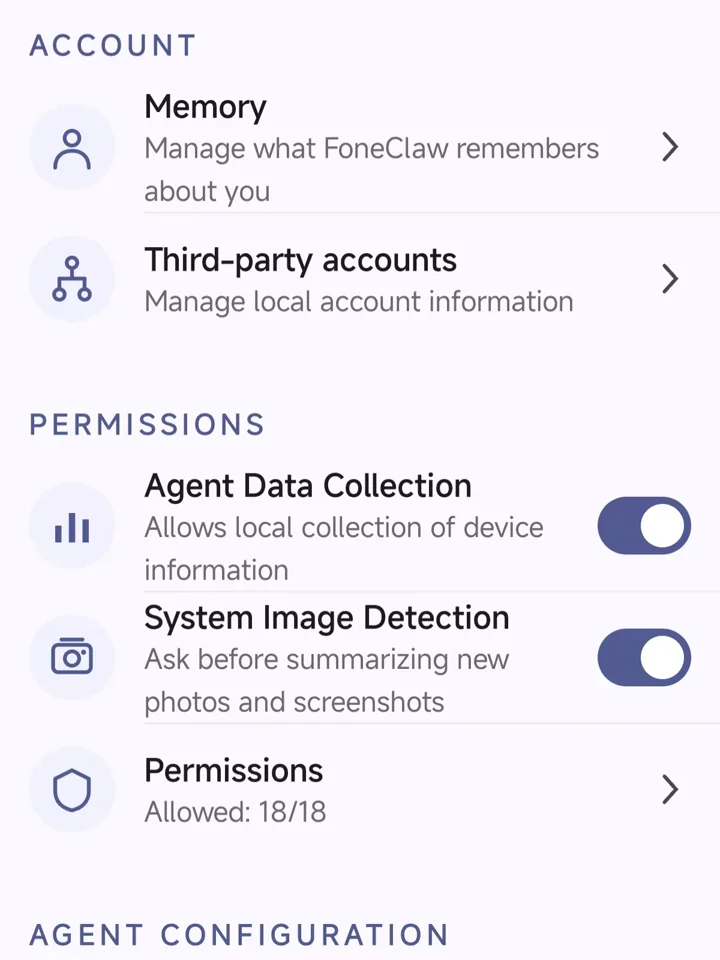
Settings expose local data controls, on-demand permissions, model selection, and tool approval behavior.
FoneClaw prompts for the specific Android permission only when the requested task needs it.
Choose Auto approve, Follow tool policy, or Deny all to match how much autonomy you want.
Review memory, third-party account information, agent data collection, image detection, and permissions from Settings.
Common questions about FoneClaw features.
The public GitHub catalog includes 100+ built-in tools for device checks, SMS, calls, system settings, Wi-Fi and Bluetooth, screenshots, email, calendar, maps, web tasks, Workflows, and Skills.
No. When a task needs a permission, FoneClaw prompts for that specific access and guides you to enable it. You can review permissions later in Settings.
FoneClaw can prepare and execute supported communication actions. Whether a tool asks for approval depends on your selected Tool Approval Mode and the applicable tool policy.
No. Email needs IMAP/SMTP setup, maps need an installed map app, image auto-summary needs the relevant detection and overlay permissions, and some Android settings require additional system permissions. Core features like phone status, SMS summary, and system settings work out of the box.
No. You can use the free FoneClaw default model. You can also configure a mainstream online model with an API Base URL and API Key, or import a compatible on-device model.
Download FoneClaw and test its public Android tool set, on-demand permissions, and practical everyday tasks.