
Android Halo Status Bar: Background AI Agent Hub, Status, and Availability
What Android Halo is, when Google says it will arrive, what its status bar can show, and why visibility does not grant an AI agent phone permissions.
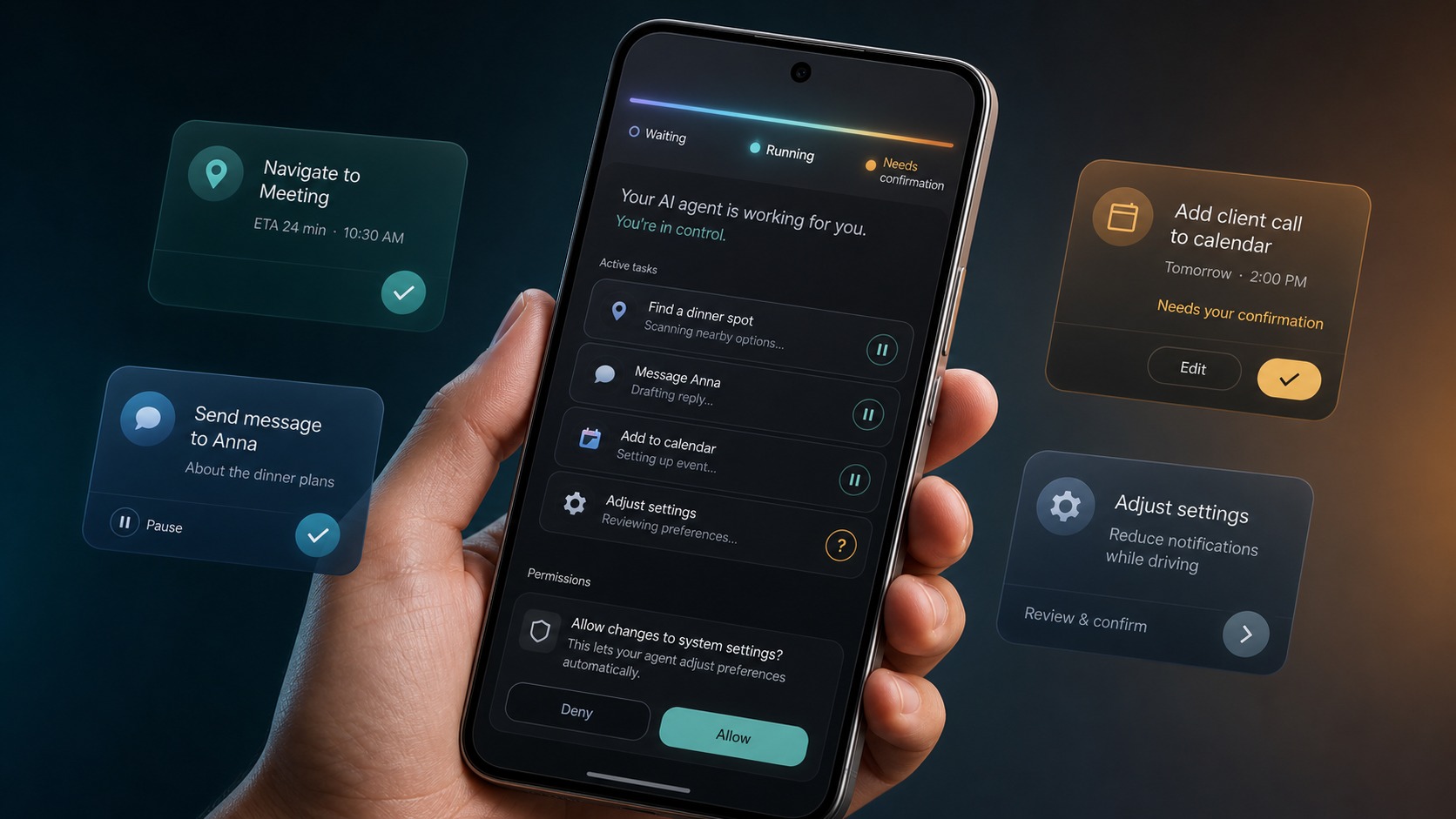
- Android Halo is Google's preview of a top-of-screen status and attention surface for background AI agents, with availability planned for later in 2026.
- Google has shown task, live, and message states, but has not published complete device, agent, region, language, or release-channel support lists.
- An Android Canary teardown found work-in-progress references to an icon control and an unannounced Agent Task device feature; neither was live when reported.
- Android Halo communicates agent activity but does not supply phone permissions, credentials, service integrations, sandboxing, or approval authority.
- FoneClaw provides configurable-model reasoning and supported Android actions with visible results, permissions, user confirmation, and practical fallback, independently of Android Halo.
Android Halo Is a Preview, Not a Broadly Released Feature
Android Halo is Google's proposed status bar hub for background AI agents. It is designed to show at a glance what an agent is doing from the top of the phone screen, allowing users to follow activity without repeatedly reopening the agent application.
In the official Android Halo preview published on May 19, 2026, Google showed the surface communicating when an agent takes on a task, enters live mode, or sends a message. The company said Android Halo would become available later in 2026 and work with Gemini Spark and other supported agents.
That announcement established the idea and a release window, but not a complete compatibility list. Google did not name every supported phone, agent, region, language, account type, or Android release channel. It also said Gemini Intelligence on its most advanced devices would add further Android Halo capabilities without describing those additions.
The most accurate current status is therefore “officially previewed for later in 2026.” It should not be treated as a standard feature already enabled across stable Android devices. A preview demonstrates the intended experience; public availability requires a dated release announcement and device-level support information.
Android Halo also solves a narrower problem than the phrase “AI agent on Android” may suggest. It gives the user a persistent view of agent status and a place for attention. For the broader device category, read Agentic Phone Explained: What an Agentic AI Phone Means in 2026.
Why Background Agents Need a Status Bar Hub
A background agent creates an unusual interface problem: the user wants the task to continue while using another app, but still needs to know whether the agent is working, waiting, finished, or asking for attention. A normal chat window cannot provide that visibility after the user leaves it.
Android Halo moves a concise status signal to the top of the screen. In Google's preview, the agent can remain visible while the user continues with other work. A task state indicates that work has been accepted or is underway; live mode signals an active interaction; a message state tells the user that the agent has information to review.
This is more useful than a generic “agent running” indicator because background tasks change meaning over time. An agent researching travel options may first gather results, then need a missing date, and finally present a shortlist. A phone action could prepare a message but pause before sending it. The status surface should help the user distinguish continued work from a point that requires a decision.
Attention also needs to be proportional. Routine progress should remain subtle, while confirmation, failure, or an urgent message should be noticeable. A permanent animation with no meaningful state would add clutter without improving control. Android Halo's value will depend on whether it communicates the reason for attention clearly and lets users return to the relevant task context.
This design direction supports the wider command-center role discussed in Mobile Agent Control: Why the Phone Is Becoming the AI Agent Command Center. The phone is not only where an agent is launched; it is where users monitor, interrupt, approve, and inspect work that may continue across applications or services.
Confirmed, Found in a Teardown, and Still Unknown
Android Halo information currently comes from two evidence levels. Google's announcement confirms the preview and its limited named scope. A later Android Canary teardown exposes work-in-progress strings that may indicate implementation plans, but those strings are not equivalent to a shipping feature.
| Topic | Evidence level | Status as of July 27, 2026 |
|---|---|---|
| Top-of-screen agent status | Confirmed by Google | Previewed as an at-a-glance view of agent activity. |
| Task, live, and message states | Confirmed by Google | Named examples in the May preview. |
| Availability | Confirmed release window | Google said later in 2026; no exact public date was given. |
| Gemini Spark | Confirmed by Google | Named as one agent intended to work with Halo. |
| Other agents | Confirmed in general | Google said other supported agents, without publishing the complete list. |
| Gemini Intelligence additions | Confirmed but undescribed | Additional capabilities were promised for advanced devices, with details to follow. |
| Show or hide agent icon | APK teardown finding | Work-in-progress strings suggest a possible status bar control; it was not live. |
| Agent Task device feature | APK teardown finding | Strings indicate a possible device prerequisite; Google has not officially detailed it. |
| Supported devices and regions | Unknown | No complete public list was provided in the May announcement. |
| Developer interfaces | Unknown | No public Halo integration API was established by the approved sources. |
The July 10 Android Authority teardown of Android Canary 2607 found strings for a status bar settings section and a control that could show or hide the assistant-agent icon. It also found text indicating that the icon would depend on an Agent Task feature supported by the device.
Android Authority stated that neither change was live and warned that teardown predictions may not reach public release. The icon control and Agent Task dependency should consequently be tracked as implementation clues, not setup instructions or confirmed requirements.
A Practical State Model for Background Agent Work
Google has named task, live, and message states, but a useful background-agent experience eventually needs to answer more specific questions. Has the request been accepted? Is the agent still working? Does it need information? Is a consequential action waiting for approval? Did every step finish?
The following model is a product-design framework for evaluating Android Halo and similar status surfaces. It is not a description of Google's current interface specification.
| State | Meaning for the user | Useful response |
|---|---|---|
| Accepted | The agent received the request and created a task. | Open the task plan or cancel before work begins. |
| Working | The agent is processing information or carrying out supported steps. | View current progress or let the task continue. |
| Waiting for information | A required value or choice is missing. | Provide the missing detail without restarting. |
| Waiting for confirmation | A consequential action is prepared but not committed. | Review the target and effect, then approve or reject. |
| Live interaction | The agent needs an active back-and-forth exchange. | Return to the conversation or interactive surface. |
| Completed | The requested outcome was achieved. | Inspect the result, receipt, reference, or saved artifact. |
| Partially completed | Some steps succeeded while another could not finish. | Review completed work and choose a recovery path. |
| Failed | The task stopped before reaching the requested result. | See the failure point and retry or change approach. |
| Stopped | The user or system ended the task. | Confirm which actions occurred before stopping. |
| Message available | The agent has an update that does not require immediate action. | Read it when convenient. |
The distinction between waiting and working is especially important. A task that silently waits for confirmation can look active even though no progress is possible. Conversely, a message should not imply that an agent is still changing the phone. Clear states reduce unnecessary checking and make interruption safer.
For a closer look at when background work should pause, read Gemini Background Agents and Phone Actions: What Needs Confirmation.
Visibility Does Not Create Phone-Control Authority
Can Android Halo let an AI agent control a phone? The status surface itself is not the source of control. It communicates task state and can provide an attention or interaction point. The capabilities needed to perform work must come from other parts of the agent system.
The model interprets language and contributes reasoning. The agent runtime turns that reasoning into a plan and manages task state. Android actions, app APIs, or service integrations provide supported ways to do something. Permissions and credentials determine which data and accounts can be accessed. A sandbox controls where certain work runs. User confirmation authorizes a consequential step, while logs and receipts provide evidence afterward.
Android Halo can show that this system is working or needs attention, but it does not replace any of those components. A visible payment state does not approve a charge. A travel-agent icon does not supply a booking account. A progress indicator does not grant contact, messaging, file, location, or accessibility permissions.
This separation matters because visible activity can create a misleading sense of authority. Users should be able to open the task and identify the responsible agent, the action in progress, the connected service, and the next decision. A generic icon without that context would make monitoring harder rather than easier.
Sandboxing and device permissions solve different problems. AI Agent Sandbox vs Phone Permissions: Why Secure Agents Still Need Boundaries explains why an isolated runtime still requires separately granted authority before it can access phone functions or personal accounts.
Evidence also extends beyond the status bar. AI Agent Identity, Permissions, and Audit Trails: The Safety Stack Phone Agents Need covers the records required to connect an agent, its permissions, confirmation events, actions, and final results.
How to Read Future Device and Agent Support Announcements
Which phones and agents will support Android Halo? Google's May preview confirms Gemini Spark and refers to other supported agents, but it does not provide the complete answer. Future announcements need to be read across several compatibility dimensions rather than reduced to a single Android version label.
Device support should identify exact models or hardware requirements. The teardown's Agent Task reference may eventually matter, but Google has not established its public meaning. Buyers should wait for official documentation connecting any device feature to released phones.
Release-channel support should distinguish experimental, Canary, beta, and stable availability. Finding strings in Android Canary shows development activity; it does not establish that the same behavior is enabled for public users or will appear unchanged in a stable release.
Agent support needs a named compatibility list or documented integration process. “Other supported agents” could cover a small launch group or a broader ecosystem. Developers need to know who can publish status, which states are allowed, how attention is requested, and whether users can revoke access.
Regional, language, and account support may also vary. An Android Halo surface could be present while the underlying agent, service, or Gemini tier remains unavailable for a particular account. Compatibility should therefore be checked end to end: phone, system release, agent, service, language, region, and account type.
Google's reference to Gemini Intelligence adds another potential tier. The baseline Halo preview was described separately from the additional capabilities expected on the company's most advanced devices. Until those capabilities are documented, they should not be inferred from the phrase alone.
Readers comparing Google's assistant direction with an Android action product can use Gemini Spark vs FoneClaw: Cloud Assistant or Phone AI Agent? to separate model and assistant features from supported device actions.
FoneClaw's Approach to Visible Android Action Workflows
Android Halo highlights a product principle we consider essential: an agent should not disappear once it begins working. Users need visible progress, meaningful confirmation points, a clear result, and a practical way to recover when a step cannot finish.
FoneClaw is a configurable-model Android phone agent. The configured model handles language understanding, reasoning, and planning. FoneClaw then performs supported Android actions, displays visible states and results, works with the relevant permissions, requests user confirmation for consequential steps, and provides fallback when direct user handling is appropriate.
For example, a supported workflow may begin with the model interpreting a request and identifying the required details. FoneClaw can carry out the supported phone steps while showing what is happening. If the workflow reaches a message send, account change, checkout, or another consequential action, the target and effect remain available for review before confirmation.
A successful finish should produce more than a disappearing progress indicator. The user should see the result: a draft, changed setting, opened destination, sent item, reference number, or other visible evidence appropriate to the task. A partial result should state which steps succeeded and what remains.
FoneClaw's current product scope does not depend on a native Android Halo integration. Its execution visibility is part of FoneClaw's own supported workflow experience. If Android later publishes stable Halo interfaces and compatibility requirements, those details can be evaluated against FoneClaw's model-choice, action, permission, confirmation, and recovery approach.
The wider relationship between intent, plans, and Android actions is covered in Mobile Agent Control: Why the Phone Is Becoming the AI Agent Command Center. The essential principle is the same: background work should remain understandable and interruptible.
What Google Still Needs to Explain
The next useful Android Halo announcement should do more than repeat the later-in-2026 window. Users and developers need a release status that names the public channel, eligible devices, supported agents, regions, languages, and account requirements.
Developer documentation should explain how an agent publishes progress, which state transitions are supported, how frequently updates may occur, and what happens when multiple agents run at once. It should also define whether tapping Halo opens a common task hub, the originating agent, or a system-managed detail view.
User controls deserve equal attention. The Canary teardown suggests that icon visibility is being explored, but a released design should clarify how users show or hide the surface, stop a task, silence routine updates, prioritize confirmation requests, and identify the agent responsible for each item.
Accessibility details will determine whether the status bar hub works beyond visual cues. States should have meaningful labels, screen-reader support, distinguishable attention levels, and alternatives that do not depend only on color or animation. Privacy guidance should explain what task information appears on screen and what remains hidden while the phone is locked.
Google also needs to define records and recovery. Users should know where completed, failed, and stopped tasks can be reviewed; whether an agent message remains available after the icon disappears; and how to inspect partial work before retrying. A status surface becomes a control surface only when it helps users understand and resolve the task.
For now, Android Halo is a confirmed Google preview with a focused promise: keep background-agent activity visible at the top of the phone. The icon setting and Agent Task references remain teardown findings, while device support, developer access, detailed state semantics, and Gemini Intelligence additions await official documentation.