
Why AI Agents Are Slow: Phone Agent Latency, Android Actions, and Faster Governed Workflows
Why AI agents feel slower than chatbots, what causes phone agent latency, and how FoneClaw improves Android response time with governed tools, permissions, approvals, and recovery.
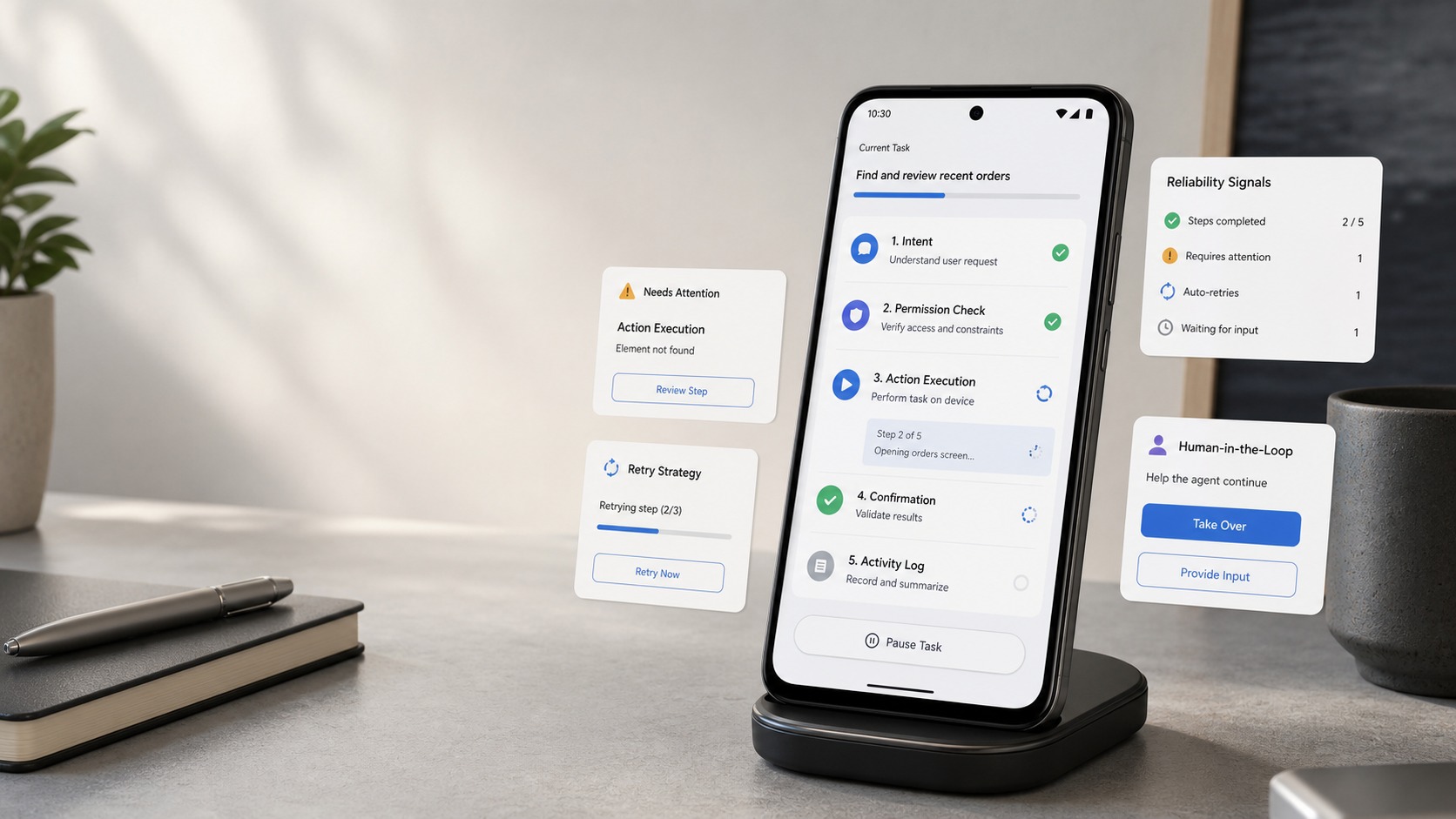
- AI agents feel slower than chatbots because they must observe, plan, request permission, act, verify the result, and recover from failures instead of only generating text.
- AI agent latency comes from several stages: input capture, model inference, tool selection, Android state checks, network calls, permission prompts, action execution, result verification, and retries.
- The right way to speed up an Android AI agent is to measure time to first feedback and time to verified result separately, then reduce avoidable waits without hiding safety controls.
- FoneClaw shortens governed phone-agent workflows with a free default model, compatible model configuration, 100+ built-in tools, per-tool controls, approval overrides, permission recovery, and visible outcomes.
Why AI Agents Feel Slower Than Chatbots
The direct answer to why AI agents are slow is that an agent is judged by completed action, not only by generated text. A chatbot can feel fast because it returns an answer for the user to inspect. A phone agent has to observe the Android state, understand the request, choose a supported tool, request permission if needed, pause for approval when the action has consequences, perform the step, verify the result, and recover if the phone is not in the expected state.
That makes phone agent response time the sum of several smaller delays. Some come from the LLM. Some come from the network. Some come from Android itself: app launches, screen state, permissions, overlays, connectivity, and account state. Some delays are deliberate because sending a message, deleting an item, changing a setting, or sharing location should not happen as casually as writing a paragraph.
The useful performance question is therefore not "why is the model slow?" It is "which stage is slow, and is that delay avoidable?" A faster model can help, but it does not remove the need for state checks, permissions, approvals, verification, and recovery. For readers who want the full request-to-action architecture before the performance diagnosis, AI Agent Phone Control: How Android Phone Agents Turn Intent Into Action explains the execution path behind phone-agent behavior.
Where AI Agent Latency Comes From
AI agent latency should be measured as a pipeline, not as one vague wait. Two measurements matter most. Time to first feedback is how long it takes before the user sees that the agent understood the request and is doing something useful. Time to verified result is how long it takes before the action is complete, checked, and visible. A phone agent can improve perceived speed by giving earlier feedback even when the final action still takes longer.
Model inference is only one part of the budget. The agent may need speech recognition or text input handling, prompt construction, model reasoning, tool selection, Android state inspection, tool execution, network calls, result parsing, and final verification. Some tool and network calls can run in parallel when they are independent. Others must be serial because the next step depends on the previous result. For example, an agent cannot safely send a prepared message before it identifies the recipient and shows the payload.
| Latency stage | What happens | How to improve it |
|---|---|---|
| Input capture | The user speaks or types a request, and the agent identifies the task. | Use clear voice capture, short prompts, and quick acknowledgement. |
| Model reasoning | The LLM interprets intent and proposes a plan. | Choose the right model route for the task instead of using one model for everything. |
| Tool selection | The agent maps the plan to supported tools. | Keep tool scopes clear and avoid over-broad planning. |
| Phone state check | The runtime checks screen, app, account, permission, or connectivity state. | Reuse confirmed state when safe and recheck when the phone may have changed. |
| Permission or approval | Android or the agent asks for a user decision. | Remember per-tool preferences where appropriate while keeping consequential actions visible. |
| Execution and verification | The tool runs, then the agent checks the observed result. | Prefer structured supported actions and stop cleanly on mismatch. |
| Recovery | The agent handles missing access, failed tools, or unexpected app state. | Return a clear recovery path instead of retrying blindly. |
This is why a phone agent can feel slower than a chatbot even when the model is fast. The agent is doing more than answering. It is trying to reach a result that is correct on a live device.
Why Android Phone Actions Add Delay
Android phone actions add delay because phones are not static documents. A real phone changes between plan and action. The app may be locked, the wrong account may be active, a notification may cover the screen, the network may stall, the keyboard may appear, or Android may ask for a permission before the task can continue. A good phone agent has to treat those changes as state, not noise.
Target resolution is often the hidden cost. The user may say, "send Alex the receipt," but the agent must identify which Alex, which receipt, which app, which account, and whether the message should be drafted or sent. If any part is ambiguous, asking one clarification is faster than executing the wrong action and forcing the user to repair the result.
Visible verification also takes time, but it prevents silent wrong-state execution. After opening an app, preparing a message, changing a setting path, or creating a follow-up, the agent should confirm what actually happened. A plan is not proof of execution. A tool result, screen state, or app response is the stronger signal.
That is the core difference between answering and acting. A chatbot can recover by generating a better paragraph. A phone agent may have already changed something on the device. FoneClaw focuses on supported Android actions through governed tools so the runtime can check scope, permissions, action targets, and visible results rather than pretending every app surface is equally controllable.
Permissions and Approvals Versus Speed
Permissions and approvals are often blamed for AI agent latency, but they are not just removable overhead. Android protects restricted data and protected actions through permissions. The Android permissions overview explains that apps need user-facing grant flows for protected capabilities. A phone agent must work within that system.
There are two separate pauses. The first is the Android permission prompt: can the app use location, microphone, notifications, contacts, files, or another protected capability? The second is action approval: should the agent perform this specific step with this target and payload? Location permission can make route planning possible, but it does not approve sharing the user's location with a contact. Mail account access can allow retrieval, but it does not approve sending a message.
Speed improves when the product remembers safe preferences without hiding consequence. FoneClaw requests permissions when a task needs them. The current FoneClaw release information describes per-tool management, approval overrides, permission recovery, and stronger failure handling. That means users can keep low-risk tools efficient, tighten sensitive tools, and recover more clearly when a permission blocks the path.
The performance rule is simple: reduce repeated friction, not meaningful control. Opening an app should not feel like filing paperwork. Sending a message, deleting data, changing account state, or sharing private context should remain visible. For the broader governance model behind those decisions, AI Agent Identity, Permissions, and Audit Trails for Phone Tool Governance explains why approval and records belong at the tool boundary.
Self-Harness and Failure Recovery
Some phone-agent speed problems are really harness problems. The model may understand the task, but the surrounding harness determines what tools exist, how they are called, what feedback returns, how errors are classified, and how recovery is attempted. A weak harness turns every mismatch into another expensive model call. A stronger harness gives the agent clearer trajectories: what was attempted, what worked, what failed, and what should happen next.
The Self-Harness research paper studies agents that improve their harness using execution trajectories. The important takeaway is not that a base model alone solves agent performance. Harness quality can change task outcomes by improving how the agent interacts with tools and learns from previous execution paths. That research direction is relevant to phone agents because phones produce exactly the kind of messy traces that matter: denied permissions, blocked screens, stale app state, bad arguments, partial results, and successful recoveries.
At FoneClaw, we treat Self-Harness as external research with a useful engineering lesson: execution traces are only valuable when they lead to safer tool boundaries, clearer failure causes, better recovery steps, versioned changes, regression tests, rollback paths, and visible results for users. Current FoneClaw capabilities focus on governed Android execution: supported tools, per-tool controls, approval behavior, permission recovery, and failure handling that users can understand. The broader self-improving harness idea points toward disciplined learning loops, not uncontrolled runtime changes.
Good recovery can reduce both real and perceived latency. If a permission is missing, the agent should say which one and why. If the app state changed, it should stop at the mismatch. If a tool result is partial, it should explain what completed and what did not. Readers who want the deeper learning-loop and rollback model can use Self-Improving Phone Agents Need Versioned Skills, Tests, and Rollback.
How to Measure and Improve Phone-Agent Speed
To speed up an Android AI agent, measure the stages instead of arguing about one stopwatch total. Track time to first feedback, time to tool selection, time waiting for permissions or approvals, tool execution time, network wait, verification time, retry count, and final success rate. Reliability and latency have to be evaluated together because a very fast wrong action is not a performance win.
The first practical improvement is faster feedback. A short acknowledgement such as "I found the message and am preparing a reply for review" can make a workflow feel responsive while the final result is still being built. The second improvement is fewer retries. Clear tool inputs, supported action paths, and better state checks prevent the agent from looping through the same failed step.
| Symptom | Likely cause | Better fix |
|---|---|---|
| Long silence before anything appears | No early feedback or slow model routing. | Return first feedback sooner and use a faster model route for simple tasks. |
| Fast plan, slow result | Tool execution, network calls, or app state waits. | Measure the tool stage and avoid unnecessary serial calls. |
| Repeated permission interruptions | Permissions are requested late or not recovered clearly. | Ask in context and guide recovery when access is missing. |
| Many retries | Stale screen state, ambiguous target, or weak tool arguments. | Recheck state and ask a clarification before acting. |
| Fast but unreliable completion | Verification is skipped. | Keep visible result checks for consequential actions. |
Model routing is one lever, not the whole answer. A smaller or faster model may be enough for app launch and simple command parsing, while a stronger model may be worth the wait for long workflows or ambiguous instructions. For model routing tradeoffs, Kimi K3 vs DeepSeek V4 vs GLM-5.2 for Phone Agents: Routing, Cost, and Android Actions keeps the model-selection detail separate from end-to-end latency.
How FoneClaw Shortens the Governed Action Path
At FoneClaw, we treat speed as a governed execution problem. FoneClaw is an Android phone-agent runtime with a free default model, and users can configure compatible models with API Base URL and API Key when they need a specific endpoint. The model handles reasoning and planning. FoneClaw handles supported tools, permissions, approvals, visible results, and recovery.
The practical speed gain comes from shortening avoidable steps while preserving meaningful control. FoneClaw's 100+ built-in tools give the agent a clearer action surface than visual guessing alone. Per-tool management and approval overrides let users tune trusted low-risk actions differently from consequential actions. Permission recovery and stronger failure handling reduce time lost to blocked paths.
Start with a low-risk test. Ask FoneClaw to open an app, summarize visible non-sensitive context, prepare a message without sending it, or guide a settings path. Watch three timings: how quickly it acknowledges the request, how quickly it selects the tool path, and whether the verified result appears without retries. Then test one governed multi-step task and check whether approval appears at the right moment.
That is how an Android agent becomes faster without becoming careless. Voice-first interaction keeps simple requests quick. Buttons and touch remain available for correction and approval. The performance goal is not to eliminate every pause. It is to make the right stages fast, the risky stages visible, and the recovery path clear when the phone does something unexpected.