
Xiaodou vs FoneClaw: Personal Information, Planning, and Android Tasks
Compare Xiaodou and FoneClaw for personal assistance, connected email and calendar, information summaries, and Android follow-up tasks.

- Choose FoneClaw when you want an Android personal assistant that combines authorized email and calendar collection, voice requests, information summaries, and supported phone actions. Consider Xiaodou for its advertised conversational planning and daily-service assistance.
- FoneClaw automatically pulls authorized email and calendar data. Information Inbox brings Calendar, SMS, Email, and Notifications into one place, while summaries work from captured records that may need refreshing or checking against the original source.
- Xiaodou is Doubao's independently listed personal-assistant app, not the preinstalled Doubao Phone Assistant. Its advertised calendar, reminder, daily-service, and writing features do not establish specific mailbox integrations or unrestricted Android control.
- Start with one source-grounded request, then authorize one precise follow-up. For calendar changes, review the existing event, date, timezone, duration, and destination; for an undated personal to-do, FoneClaw keeps it Unscheduled.
Choose by the Personal Task You Need
For Android users comparing Xiaodou vs FoneClaw, our recommendation is FoneClaw when the job begins with your personal information and ends with a practical follow-up. Connect authorized email and calendar accounts, review information alongside SMS and notifications, ask by voice or text, and request a supported calendar, to-do, or phone action. You do not have to rebuild that context by pasting every message into a conversation.
Xiaodou is worth considering when its advertised conversational planning and daily-service assistance matches your needs. The official Xiaodou App Store listing identifies it as Doubao's personal-assistant app, developed by Beijing Chuntian Zhiyun Technology Co., Ltd. It is distinct from the preinstalled Doubao Phone Assistant on Nubia hardware and from unrelated apps with similar names.
Its description covers information queries, calendar and reminder help, daily services, order and after-sales assistance, routine wellness reminders, and writing or summaries. Those are useful categories, but the particular service connection and completed action still matter. A medication reminder is not medical advice, and order assistance does not establish automatic purchasing or returns.
You do not need to replace your phone to make this choice. Start with the app available to your account and device, then choose a task whose source and result you can inspect.
Compare the Same Everyday Jobs
Both products belong in a personal-assistant comparison, but their documented scope differs. The table compares useful jobs rather than assigning invented speed or reliability scores. For Xiaodou, the distinction is between its published descriptions and details you should check in the actual app.
| Everyday need | FoneClaw | Xiaodou |
|---|---|---|
| Speak or type a request | Voice and text requests can lead to summaries, planning, and supported Android actions. | Advertises conversational assistance and voice or text entry for planning and reminders. |
| Use email and calendar context | Connect accounts and automatically pull authorized data; request relevant source reads when needed. | Advertises calendar assistance; check supported account connections and any email-ingestion workflow in the app. |
| Review personal information in one place | Information Inbox has Calendar, SMS, Email, and Notifications categories. | The listing does not describe an equivalent four-category inbox; inspect its actual information views. |
| Save a to-do or calendar result | Personal to-dos and supported calendar actions, with explicit date, destination, and approval requirements. | Advertises calendar, to-do, and reminder help; check where the resulting record is saved. |
| Continue with a phone task | Supported phone tools operate within Android permissions and approval settings. | Daily-service assistance is advertised; verify the particular action rather than assuming system-setting or arbitrary app control. |
| Choose a model | A free default model is available; compatible custom models are optional. | Check the app's offered options; external-model configuration is not established by its listing. |
| Add focused capabilities | Scenario plugins run inside a compatible FoneClaw Agent. | The listing describes service categories, not a matching plugin system. |
| Install and understand usage costs | Android editions and account routes differ; model and online-service conditions apply. | iPhone/iPad listing and Android distribution exist; verify your store, account access, and purchase terms. |
For either assistant, separate an answer, a proposed action, and a saved result. A useful schedule suggestion does not become a calendar event until the intended calendar contains it.
Bring Your Personal Information Together in FoneClaw
FoneClaw is particularly useful when your day is spread across several sources. After you connect email and calendar accounts and authorize access, our assistant can automatically pull the permitted data. Information Inbox brings captured calendar information, SMS, email summaries, and notifications together for review and source-grounded questions.
The four categories serve different purposes. Calendar helps you inspect captured commitments. SMS contains available captured text-message information. Email holds captured email summaries. Notifications contains captured app alerts. Choose the relevant day and category rather than assuming every record is on the current screen.
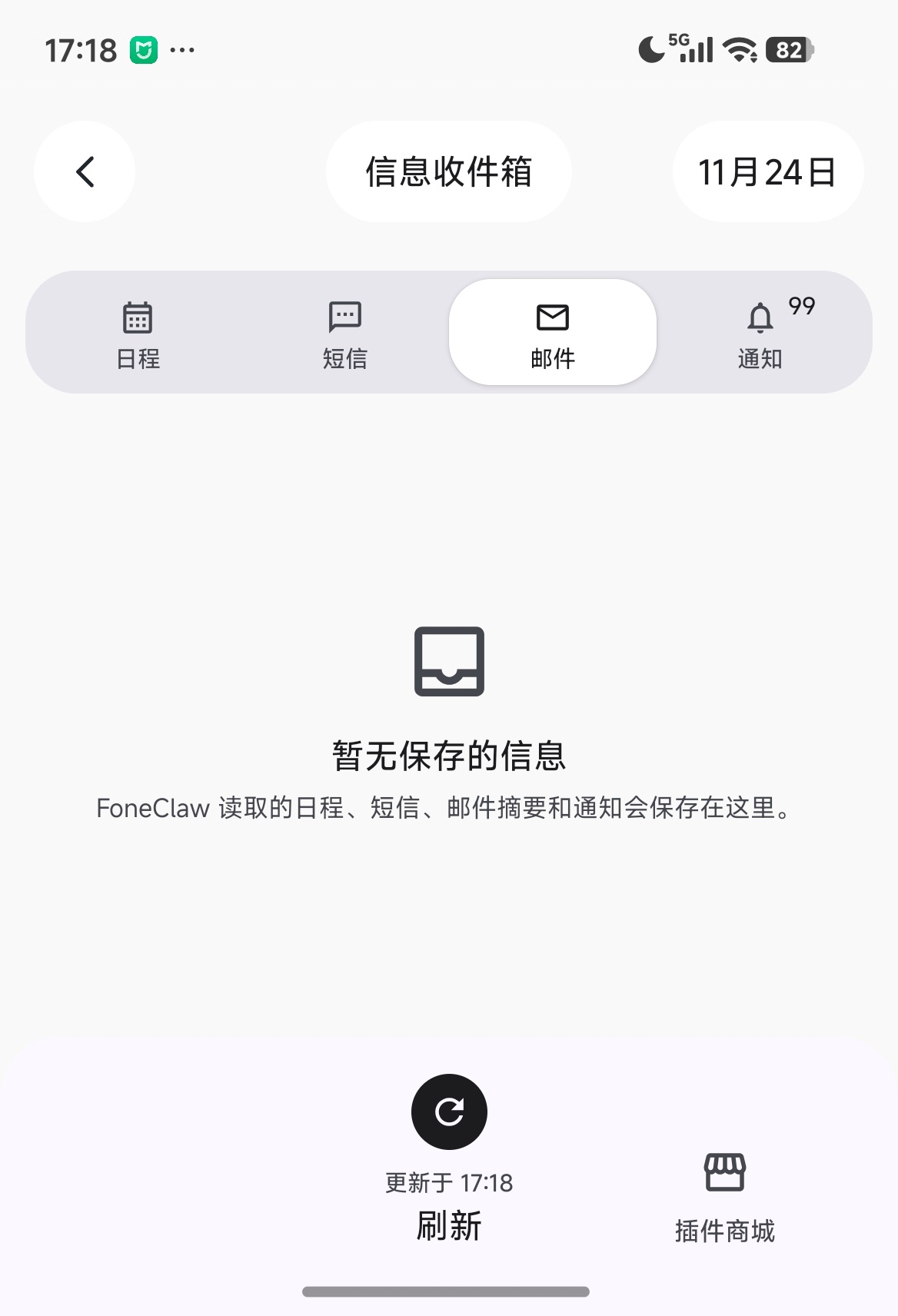
This real interface example uses Chinese labels. Its empty Email view illustrates the selected screen, not a synchronization failure or proof of what another account contains. The Refresh control and last-updated time help you inspect the current view; they do not establish a fixed collection interval or complete historical coverage.
A useful morning request could be: Summarize the meetings and follow-ups in my available records for today. Identify the source of each item and separate confirmed commitments from suggestions. Do not change anything. You can speak that request, review the relevant records, and then decide which item deserves action.
Automatic collection and a requested summary are different stages. An Information Inbox query reads captured local records, not a guaranteed fresh scan of every live mailbox and calendar. When a preview is incomplete or a change matters, request the specific source message or event through the connected account before acting.
From there, you can ask us to save a personal to-do, work with the intended calendar, or perform another supported phone task. A to-do without a definite date stays Unscheduled. Model choice and scenario plugins provide further personalization, but they are optional additions to a useful first workflow. Our FoneClaw Features page explains the broader assistant capabilities.
Follow a Changed Meeting From Email to Calendar
Consider this hypothetical example, not a reported device test. A message says that a meeting titled Design Review has moved from 2:00 PM to 3:00 PM on November 30, 2026, in the America/New_York timezone. It still lasts 30 minutes and belongs in your selected Work calendar.
Begin with a read-only request: Find the Design Review change message and the existing Work calendar event for November 30, 2026. Compare them using America/New_York time, check for a conflict at 3:00 PM, and show the proposed change without saving it.
FoneClaw can use the connected email and calendar context rather than requiring you to paste the entire thread. Review the sender, relevant message, existing event, selected calendar, and any conflicting appointment. If several events share that title, identify the correct one before proceeding.
| Field to review | Intended result in this example |
|---|---|
| Existing item | The identified Design Review event, not a newly created duplicate |
| Date and calendar | November 30, 2026, in Work |
| Time and timezone | 3:00 PM to 3:30 PM, America/New_York |
| Other actions | No email reply or unrelated event changes |
If those details are correct, explicitly request the supported update and complete the applicable approval. Source access alone is not permission to modify the event. Then open the actual calendar record and inspect the saved start, end, timezone, and calendar. A proposed mapping or conversational acknowledgment is not the saved result.
For Xiaodou, you can evaluate the same meeting goal through its advertised calendar assistance. First check how it accepts the source and identifies an existing event; its listing does not establish automatic email ingestion. Supplying the relevant information yourself, if needed, is different from a connected-mail workflow.
If either process stops after a possible write, inspect the event before retrying. Preserve a successful change rather than creating a second meeting to compensate for an uncertain response.
Start With One Information Check and One Follow-Up
You can get useful value from FoneClaw before connecting every account or installing plugins. Begin with one source you recognize and one result you actually want. For full installation guidance, How to Use a Free AI Agent on Android with FoneClaw covers the setup separately.
- Choose the appropriate edition. Use the download and account route for your region, and begin with the free default model unless you need a compatible alternative.
- Connect a relevant source. Authorize the intended email or calendar account and grant the Android access required for the information you want. Check which account and calendar you selected.
- Inspect Information Inbox. Choose the appropriate date and category. Review the last-updated time and use Refresh when needed, then inspect what is actually available.
- Ask one narrow question. For example: “What changed about this meeting, and which source supports that change? Do not edit anything.” Request the exact source if a captured summary omits essential details.
- Choose one follow-up. Ask for a clearly specified calendar action or a personal to-do. Resolve ambiguous dates and review the destination before authorizing a change.
- Verify the result. Open the saved calendar event or personal To-do Center item. Check existing records before retrying an interrupted operation.
An empty category does not prove that the source account has no email or events. Check the selected day, account connection, relevant permissions, and refreshed records. If a notice says “tomorrow” but its original date differs from your assumption, resolve the actual date and timezone rather than allowing an accidental deadline.
For notification-specific setup and captured-record limits, AI Notification Summary on Android: Pixel, Gemini and FoneClaw explains that separate workflow. You do not need broader access merely because one expected item is missing.
Check Availability, Usage, and Automation Limits
Xiaodou's Apple listing covers iPhone and iPad, lists Simplified Chinese, and offers free entry with in-app purchases. Android distribution also exists, but that does not establish availability in every store or country. Match the developer identity and check the actual account, language, and purchase conditions offered to you. Free installation does not mean unlimited assistance.
For FoneClaw, start through our FoneClaw Download page and choose an edition suited to your task. Global and mainland China accounts and services are separate; the mainland China edition has domestic APK distribution rather than a Google Play channel.
Our free default model lets you begin without configuring your own model credentials. Optional compatible providers and online services can have their own usage conditions, and supplied context may be processed over the network. Custom News, Voice Notes, Sports updates, and Artist updates run inside a compatible Agent and have no separate activation fee; model, network, and edition requirements still apply.
Finally, distinguish automatic authorized information collection from unattended task execution. Our unattended local Automations currently support read-only web research, not scheduled private-mailbox briefings or calendar writes. Android background and network conditions can delay those research runs. For broader planning, AI Personal Assistant for Planning and Scheduling on Android: From Goal to Approved Plan explains how to turn a goal into a reviewed plan.
Choose Your First Useful Assistant Task
Choose FoneClaw if your priority is an Android personal assistant that understands authorized information from several places and helps you act on it. Connected email and calendar collection, the four-category Information Inbox, voice requests, and supported follow-ups form a practical daily workflow—not just a chat window or a way to pass commands to tools.
Choose Xiaodou for closer evaluation if its advertised daily services, conversational planning, and writing assistance match the job you need, and its actual distribution and language options suit you. Check the specific connection and destination before assuming that a broad service category covers your task.
A revealing first job is small: inspect one captured calendar item, find the source of one change, and request one explicit follow-up. If you only need to remember a preparation step, save an undated personal to-do rather than inventing a meeting time. If the calendar genuinely needs changing, supply the exact event, date, timezone, and duration. The useful outcome is a clearer day and the right saved record.