
Car AI Assistants, Phone Agents, and Smart Homes: Who Controls What?
Map how Tesla, Rivian, Xiaomi, and FoneClaw divide conversation, navigation, vehicle controls, Android phone actions, and smart-home tasks.
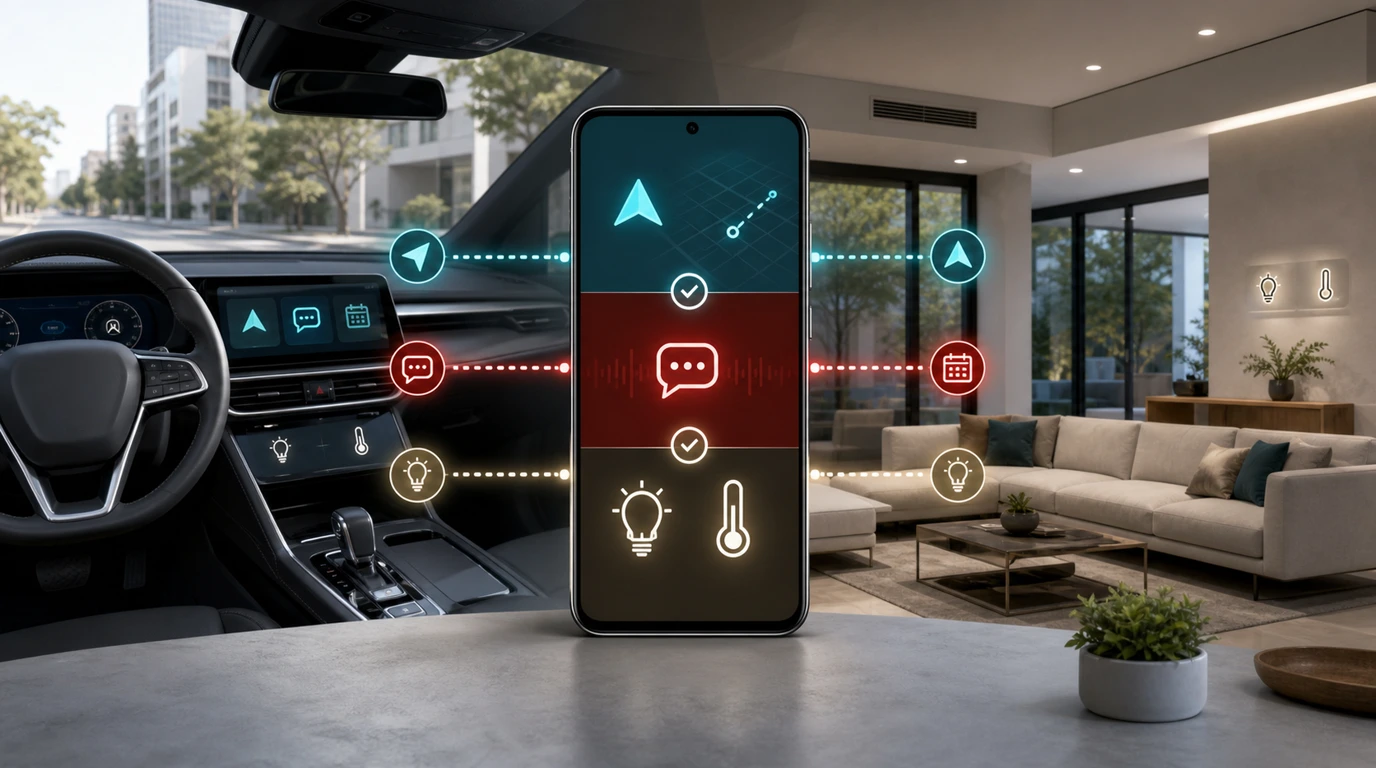
- A car AI assistant may handle conversation and navigation while established vehicle controls continue to manage functions such as climate and media.
- Phone actions and smart-home actions belong to their own systems, identities, permissions, and current device states.
- Tesla, Rivian, and Xiaomi demonstrate different approaches, with Xiaomi extending the idea across vehicles, phones, wearables, and supported home devices.
- FoneClaw focuses on the Android part of this journey: a configured model provides reasoning and planning while FoneClaw performs supported phone actions with visible results and user confirmation.
The Five Types of Control in a Car-Phone-Home Workflow
When someone says a car AI assistant can “control everything,” the useful question is: which system actually owns each action? Conversation, navigation, vehicle functions, phone tasks, and smart-home devices may appear in one spoken request, but they rely on different software, identities, permissions, and real-world state.
Conversation is the assistant's ability to answer questions, interpret natural language, and help form a plan. Navigation belongs to the route and mapping environment inside the vehicle. Vehicle control covers functions such as climate, media, doors, windows, charging, and other car-specific features. Phone actions include calls, messages, calendar entries, reminders, contacts, and supported Android app tasks. Smart-home actions operate connected lights, cameras, thermostats, speakers, locks, and automations through the relevant home platform.
| Domain | Typical request | System that should complete it |
|---|---|---|
| Conversation | “What should I prepare for this meeting?” | The configured conversational or reasoning model |
| Navigation | “Take me to the nearest available charger.” | The vehicle's supported navigation system |
| Vehicle control | “Set the cabin to 21 degrees.” | The vehicle's authorized control interface |
| Phone action | “Message Alex that I will arrive at 6:20.” | A supported phone agent using Android permissions |
| Smart-home action | “Turn on the hallway lights before I arrive.” | The connected-home platform and authorized devices |
A single request can include several rows. “Navigate home, tell Sam I am 20 minutes away, and prepare the house” combines navigation, messaging, and home automation. A capable model may understand the whole goal, but each step still needs to reach the system that can verify and perform it.
This distinction also separates voice assistance from assisted driving. A conversational assistant can answer, search, or prepare an action without becoming the system responsible for steering, braking, or monitoring the road. Our Voice Commands While Driving: Safer Android Hands-Free Guide covers the narrower hands-free phone setup question.
How Tesla, Rivian, and Xiaomi Divide Assistant Tasks
Tesla, Rivian, and Xiaomi illustrate three different ways to place AI inside a vehicle. None needs to be declared the universal winner; their published scopes show why buyers should check the exact action rather than rely on the broad label “car AI.”
According to Tesla's official Grok support page, Grok is a beta conversational assistant available hands-free in supported Tesla vehicles. It can answer questions and initiate navigation commands, including destination searches, route adjustments, and points of interest. Tesla keeps media and climate controls with its existing vehicle voice-command system. The conversational assistant and established car controls therefore share the cabin while retaining different responsibilities.
Rivian presents its assistant as an in-vehicle tool for supported everyday requests. The Rivian technology overview highlights search and navigation, while the company's AI use terms describe in-vehicle searches, route requests, contact lookup, and dialing. Rivian also has separate app functions for vehicle access, trip planning, charging, climate, and service. That arrangement shows how the vehicle assistant and mobile app can serve related needs without treating every capability as one unrestricted command set.
Xiaomi takes the broadest ecosystem view of the three examples. Its 2026 new-generation SU7 announcement describes a HyperOS-powered Smart Cabin with Xiaomi HyperAI and compatibility with the Human x Car x Home ecosystem. The Xiaomi YU7 smart-cabin overview adds large-model assistance, multimodal interaction, outside-the-car voice use, and five-zone voice control.
The comparison is not simply about how conversational each assistant sounds. Tesla separates Grok navigation from existing climate and media commands. Rivian connects search, navigation, and supported contact tasks within its vehicle environment. Xiaomi emphasizes coordinated experiences among the cabin, phone, wearables, and connected home. The right evaluation starts with the exact function, supported hardware, software version, account, and region.
For the separate question of Grok as an Android reasoning model, read Can Grok Control an Android Phone? Calls, Assistant Settings, and FoneClaw Actions.
What Xiaomi Human x Car x Home Actually Connects
Xiaomi's Human x Car x Home concept matters because it treats the vehicle as another connected environment rather than an isolated dashboard. A phone, wearable, car, and supported smart-home device can participate in coordinated experiences when the required products, accounts, apps, and software versions are in place.
The Xiaomi HyperConnect overview describes a shared device center where users can see nearby connected products and control supported devices from phones, tablets, computers, and watches. It also lists SU7 and YU7 vehicles as part of the supported-device plan and presents Human x Car x Home automations through Xiaomi Home.
Vehicle-to-home flows become concrete on the Xiaomi EV smart-cabin page. Its examples include using supported home speakers or displays to prepare vehicle climate, activating arrival or departure scenes near home, viewing connected home cameras from the cabin, receiving doorbell notifications, and controlling supported Xiaomi Home devices. Some flows require setup in the Xiaomi Home app, matching accounts, compatible accessories, or particular vehicle versions.
The connection also runs from phone to car. Xiaomi describes automatic phone connection when the driver enters, phone applications displayed through the cabin environment, and voice-assisted operations across the vehicle and compatible Xiaomi phone. These experiences depend on Xiaomi's connection settings and the same account being used where specified.
Natural-language home control is another part of the stack. The May 2026 MiCU smart-home command-understanding research reports production deployment in Xiaomi Home across 28 device categories. The research focuses on interpreting commands that may be less precise than “turn on the bedroom light,” such as a request to make a room feel more comfortable.
These pieces make Xiaomi's current signal important: a model can interpret a broad request, HyperConnect can identify participating devices, and Xiaomi Home or the vehicle system can carry out supported actions. Availability still follows the actual device list, system version, app version, account relationship, region, and rollout state. Readers seeking the wider product map can continue with Xiaomi AI Ecosystem 2026: MiMo V2.5, HyperOS AI, MiClaw, and FoneClaw Alternative.
How a Request Safely Crosses the Car, Phone, and Home
A cross-device request should move as a series of verified steps, not as one invisible command. Each participating system needs enough information to identify the user, understand the requested outcome, check current state, and decide whether confirmation is required.
Consider: “When I am 15 minutes from home, tell my family I am close and turn on the porch lights.” The vehicle or navigation system knows the route and estimated arrival time. The phone environment owns the family conversation and contact identity. The smart-home platform owns the porch light and its automation rules.
Before anything happens, five questions need answers:
- State: Is the car on the expected route, is the phone connected, and is the home device online?
- Identity: Which driver, phone account, family conversation, and home account are involved?
- Permission: Can the relevant system access location, contacts, messaging, and the selected home device?
- Confirmation: Should the message, recipient, timing, or home action be reviewed before completion?
- Recovery: If a system is unavailable, should the remaining steps continue, wait, or become a visible task?
The answer may differ for every action. Navigation can proceed once the destination is confirmed. A message may be drafted and shown before sending. A routine home scene may run under an existing automation rule, while a more sensitive device could require separate approval. If the porch light is offline, the message can still be sent and the home step can be reported as pending.
Good cross-device design preserves these boundaries while keeping the experience coherent. The user should not need to understand every internal service, but they should be able to see what was requested, which system handled it, and what succeeded. Our guide to Cross-Device AI Agents Need a Phone Handoff Layer examines this coordination problem in more depth.
FoneClaw's Role in the Android Phone Domain
At FoneClaw, we treat Android phone actions as a distinct part of the car-phone-home journey. Users configure a supported model inside FoneClaw to provide language understanding, reasoning, and planning. FoneClaw then performs supported Android actions with visible results, permission-aware steps, user confirmation, and a practical recovery path.
Suppose a car assistant or the user provides the goal, “Tell Jordan I will arrive at 5:45 and add a reminder to bring the access card.” The configured model can identify two phone tasks, resolve the time, and detect that the correct Jordan may need confirmation. FoneClaw can prepare the supported message and reminder, display the important details, request confirmation where appropriate, and show the result after each action.
This phone role complements the other domains. The vehicle environment remains responsible for supported navigation and car functions. The smart-home platform remains responsible for its connected devices and automations. FoneClaw advances the Android portion: contacts, messages, calls, reminders, calendars, maps, notifications, and other supported phone workflows.
Keeping these responsibilities clear also improves recovery. If the messaging app is signed out or the recipient is ambiguous, FoneClaw can retain the draft and request the missing choice. If a requested action is outside the supported Android path, the phone agent can present a practical next step rather than treating the request as complete.
For users who want to build the home side of the experience from an Android phone, Smart Home Voice Control on Android: Phone Setup and FoneClaw Workflow covers compatible-device setup and phone-driven routines without changing the control ownership described here.
Who Should Handle Each Everyday Scenario?
The easiest way to evaluate a car AI assistant, Android phone agent, or connected-home platform is to assign every step to the system that has the right state and authority. These scenarios show how that works in practice.
| Scenario | Vehicle or car assistant | Android phone agent | Smart-home platform |
|---|---|---|---|
| Leaving for work | Start supported navigation and show traffic | Read the next calendar item or prepare a message | Run an established departure scene |
| Arriving home | Track the route and estimated arrival | Send a confirmed arrival update | Activate supported lights or climate automation |
| Meeting changed | Navigate to the confirmed new location | Update the calendar and draft messages to attendees | No home action unless the schedule affects an existing routine |
| Calling a contact | Provide the in-car supported contact interface | Resolve the Android contact and prepare or place a supported call | No action required |
| Preparing the house | Supply route or arrival context where supported | Create a reminder or notify a household member | Control approved connected devices and scenes |
| Device unavailable | Continue supported route and car functions | Preserve drafts or tasks and show the phone result | Report the unavailable device or delayed automation |
Before relying on any scenario, check the product's published scope. A conversational assistant may understand a request without owning the target control. A vehicle app may offer remote climate or charging functions without granting those controls to every in-car AI feature. A smart-home routine may work only with selected devices, accounts, apps, and regions.
Then review the consequence of each action. Navigation generally needs a confirmed destination. Messages need the right recipient and wording. Calendar changes need a date, time, and attendee list. Home preparation needs an authorized device or scene. Vehicle functions stay with the approved car interface and its current operating state.
The practical model is straightforward: let the reasoning system understand the whole goal, then let each authorized environment perform the part it owns. FoneClaw contributes the Android phone actions, keeping supported steps visible and reviewable while the vehicle and home systems manage their respective controls.