
Airtap vs FoneClaw: Cloud Phone Agent, AutoPilot, Android Actions, and Meydo C1
Compare Airtap and FoneClaw by cloud phone, AutoPilot, routines, messaging, dashboard control, configured models, Android actions, permissions, recovery, and Meydo C1 as a dedicated hardware route.
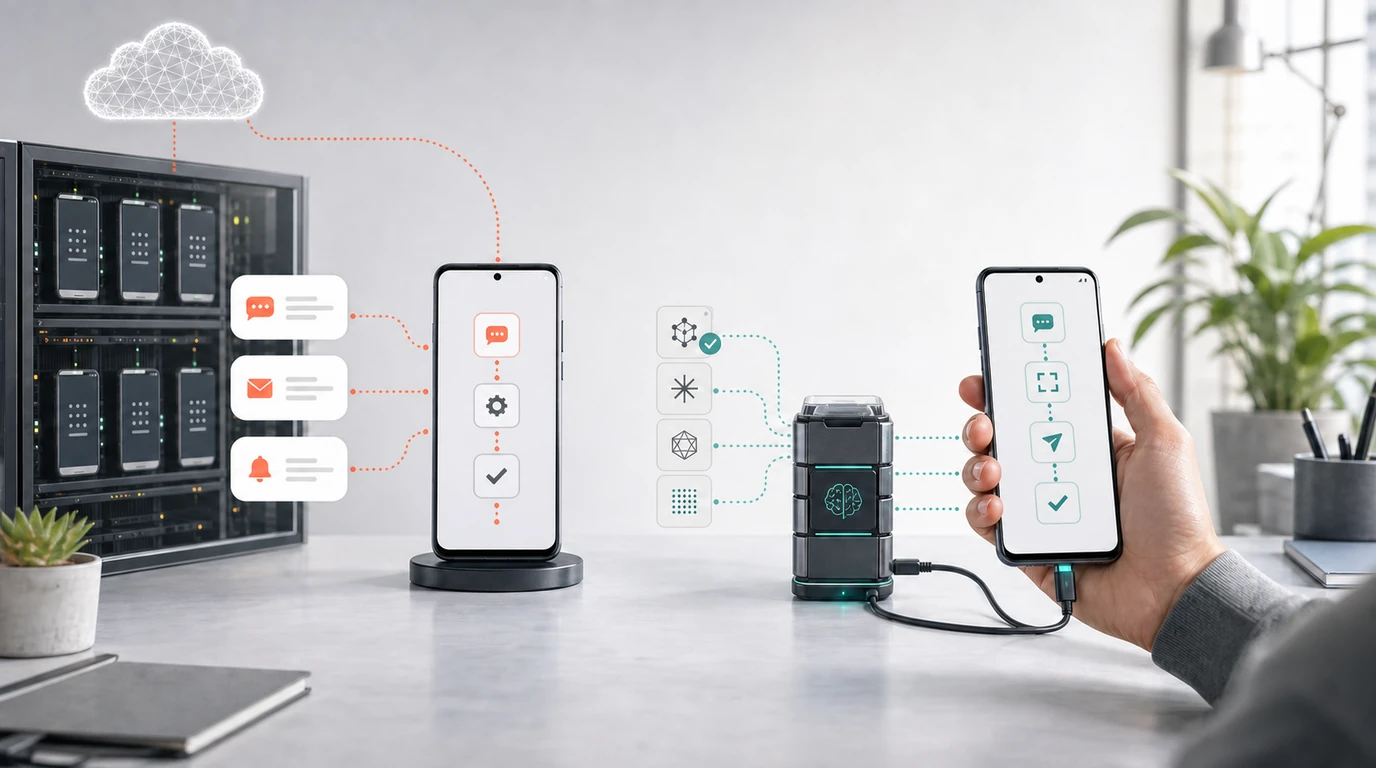
- Choose Airtap when the workflow fits messaging entry, a dedicated cloud phone, scheduled routines, a browser dashboard, and AutoPilot on a cloud phone or connected physical device.
- Choose FoneClaw when you want a configured model to reason inside an Android phone agent and drive supported actions on a compatible Android phone with visible results, permissions, approvals, and recovery.
- Airtap and FoneClaw solve different deployment problems: Airtap can maintain a separate phone environment, while FoneClaw works inside the user's Android context with 100+ built-in tools for supported workflows.
- Meydo C1 adds a separate dedicated-hardware route: Meydo C1 is Meydo hardware, DroiClaw is the main system, and FoneClaw is preinstalled as a system application.
The Airtap Versus FoneClaw Choice
The Airtap vs FoneClaw decision starts with deployment. Airtap is built around cloud AI, AutoPilot, routines, messaging entry, a browser dashboard, and a phone environment that can be either a dedicated cloud phone or a connected physical device. FoneClaw centers on a configured model reasoning through a request and FoneClaw executing supported Android actions on a compatible Android phone with visible state, permissions, applicable confirmation, and recovery.
Choose Airtap when the work belongs in a separate phone environment or should begin from messaging. Airtap's official pages describe requests through iMessage, Text/SMS, and Telegram, a browser dashboard with a live cloud-phone screen, routine management, and task history. That architecture fits recurring mobile-app work, remote task initiation, monitoring-style routines, and cases where the user wants the agent's phone activity separated from their personal handset.
Choose FoneClaw when the task depends on the Android phone the user already carries. In FoneClaw, the configured model handles language understanding, reasoning, and planning inside the agent workflow. FoneClaw maps that plan to supported Android tools, shows progress and results, works through permissions, pauses for consequential steps according to policy, and gives the user a recoverable path when the phone state blocks the task.
The two products are best compared by where the workflow lives, which account state matters, how the action is triggered, and what the user can inspect before and after the task. For the broader infrastructure tradeoff, Cloud vs Local AI Agent in 2026: Which Route Is Better for Your Phone? gives the adjacent cloud, device, and trust context.
Cloud Phone, Connected Device, or Android Runtime
Airtap's current architecture describes more than a simple cloud-only path. The default route provisions a dedicated Android cloud phone where users can install apps, sign in, send tasks, save routines, and view task history. Airtap also documents AutoPilot on a connected physical device for work tied to a specific account, location, device state, or hardware context. Runtime placement affects device dependence, connectivity, data paths, app state, and recovery.
A cloud phone can be useful when the agent needs a persistent environment. A scheduled routine can run without occupying the user's personal phone. A web dashboard can show the cloud-phone screen and task history. The workflow can be initiated through messaging while the phone action runs elsewhere. That model can reduce friction for recurring work, but the buyer still needs to verify app availability, authentication, service behavior, and task support for the intended workflow.
A connected physical device changes the tradeoff. It can keep work closer to the device, account, location, or hardware that matters. It may be the right Airtap route when cloud-phone state does not match the user's real-world setup. The verification questions are practical: which Android device is connected, which apps are signed in, what AutoPilot can operate, how the user approves sensitive steps, and what happens when the device state changes.
FoneClaw runs the phone-agent experience on a compatible Android phone. That route keeps the action inside the user's current Android context: apps, permissions, notifications, screen state, accounts, and device settings. The current product also includes Information Inbox, Memo management, Plus, UI, and reliability improvements where they help day-to-day workflows. For the model-to-action mechanics inside this Android route, AI Agent Phone Control on Android: Intent, Confirmation, Action explains how supported phone actions are governed.
AutoPilot, Routines, Tools, and Workflows
Airtap's workflow language is organized around messaging requests, AutoPilot operation, routines, status, and dashboard review. A user can start from a message thread, ask Airtap to work through mobile apps, save successful work as a routine, and inspect the task through the browser dashboard. The official technology description frames the stack as cloud brain, AutoPilot hands, and a cloud phone or physical device.
FoneClaw organizes the same broad problem through configured-model planning plus governed Android tools and workflows. The user asks in FoneClaw, the model reasons about the task, and FoneClaw routes supported work through built-in tools, workflows, shortcuts, skills, and plugin-related paths where available. FoneClaw provides 100+ built-in tools for supported Android workflows, and the important product behavior is the separation of trigger, plan, tool call, approval, status, result, failure, and recovery.
| Workflow state | Airtap | FoneClaw |
|---|---|---|
| Task trigger | Messaging entry and browser dashboard, according to Airtap. | FoneClaw's Android phone-agent interface and supported entry points. |
| Planning | Airtap AI Cloud or compatible-agent route described by Airtap. | User-configured model reasoning inside FoneClaw. |
| Execution | AutoPilot on a cloud phone or connected physical device. | Governed Android tools and supported workflows on the user's compatible Android phone. |
| Repeat work | Saved routines and scheduled operation. | Workflows, shortcuts, skills, and repeatable supported Android tasks. |
| Status and history | Dashboard live view, task history, and messaging updates as described by Airtap. | Visible progress, results, approvals, stopping, and recovery inside FoneClaw. |
The practical test is the same for both products: can the workflow move from request to supported action without losing the user's ability to inspect the state? For FoneClaw users building repeatable Android tasks, Automate Multi-Step Tasks on Android With Confirmation and Recovery gives a focused view of how multi-step workflows should remain reviewable.
Accounts, Permissions, Visibility, and Recovery
Account state is one of the biggest differences between these approaches. With Airtap's cloud-phone route, the task may run in an app session installed and authenticated on the dedicated cloud phone. With Airtap's connected-device route, the action may depend on a physical Android device and its own app state. With FoneClaw, the supported action runs in the user's Android context, where the current phone state, granted permissions, accounts, and visible screen often matter.
That means buyers should map where credentials, app sessions, and device identity live. A cloud phone can keep recurring work away from the user's daily handset, while a personal Android route can keep the workflow closer to the accounts, notifications, and local state the user already manages. Neither route removes the need to understand sign-in, permission, confirmation, and recovery behavior.
Visibility is also different. Airtap describes a browser dashboard with a live cloud-phone screen and step-by-step task history, plus messaging updates and approvals. Those surfaces are useful when the agent is acting remotely. FoneClaw keeps supported Android execution visible on the compatible phone, including progress, results, permission prompts, applicable approvals, stopping, and fallback when the task cannot continue through a supported route.
Recovery should be tested before depending on either system for recurring or consequential work. What happens if a session expires, an app screen changes, a permission is missing, a routine stalls, a task needs user input, or the device loses connectivity? For deeper trust criteria around device-side and cloud-side control, AI Agent Trust: Local Android Phone Control vs Cloud Security helps evaluate data path, visibility, and recovery without reducing the decision to a slogan.
Meydo C1 as a Separate Hardware Route
Meydo C1 adds a third route that should stay distinct from the Airtap versus FoneClaw core comparison. Airtap offers a cloud-phone or connected-device architecture for mobile task operation. FoneClaw offers a configurable Android phone-agent path on compatible Android phones. Meydo C1 is dedicated hardware: Meydo C1 is Meydo hardware, DroiClaw is the main system, and FoneClaw is preinstalled as a system application.
That route matters because dedicated hardware changes reachability. A compact pocket device with an AI-oriented design can make agent entry, short review, and visual context feel different from a large daily smartphone or a remote cloud phone. FoneClaw's preinstalled system-application role on C1 can reduce setup friction for supported FoneClaw workflows on that device, while DroiClaw remains the main system and Meydo owns the hardware product path.
C1 does not change the main two-product answer. If the decision is Airtap versus FoneClaw, still start with deployment: separate cloud phone or connected-device operation through Airtap, versus configured-model reasoning and supported Android actions through FoneClaw. C1 becomes relevant when the buyer also wants dedicated pocket hardware with FoneClaw already present as part of the device setup.
For C1 specifications, preorder status, hardware details, accessories, shipping checks, and the full architecture, use Meydo C1 AI Agent Phone: Hardware, DroiClaw, FoneClaw App, Specs, and Preorder Checks. This comparison keeps C1 brief so the Airtap and FoneClaw deployment decision remains clear.
Deployment Checklist for the Right Fit
Use a workflow checklist before choosing. Start with the target apps and accounts. If the task needs a separate, persistent mobile environment that can be triggered from messaging and inspected through a web dashboard, Airtap's cloud-phone architecture may fit the shape of the work. If the task needs the user's current Android phone state and a configured model driving supported Android actions, FoneClaw is the route to test.
Next, check always-on needs, cloud tolerance, connectivity, and recovery. Airtap's dedicated cloud phone can be useful for routines and monitoring-style work, while its connected physical-device path can suit tasks tied to device or location. FoneClaw is useful when the Android phone in the user's hand is the relevant context and the user wants visible execution on that phone. Meydo C1 is a separate dedicated-hardware option when compact device form is part of the decision.
- Define the workflow. Name the app, account, trigger, expected action, and result evidence.
- Choose the runtime location. Decide whether the task belongs on a cloud phone, connected physical device, existing Android phone, or dedicated C1 hardware.
- Check approval points. Identify where the product asks before sending, deleting, purchasing, sharing, or changing settings.
- Test failure. Expire a session, deny a permission, change a screen, interrupt the task, or remove connectivity.
- Compare cost and maintenance. Include subscriptions, model/API costs, device management, charging, account setup, and support path.
Run one reversible workflow before committing. A good test might prepare a draft without sending, create a reminder preview, summarize a visible screen, check a setting state, or run a routine that produces an inspectable result. Marketing labels do not replace this hands-on verification; the product should show trigger, plan, supported action, status, approval, result, and recovery.
Sources: This update uses the pinned current FoneClaw comparison article, Airtap's official product page, Airtap's technology page, Airtap's company overview, Meydo C1 official product information, Meydo's DroiClaw architecture article, and FoneClaw's current Features and Download pages.